> ## Documentation Index
> Fetch the complete documentation index at: https://axiom.co/docs/llms.txt
> Use this file to discover all available pages before exploring further.
# Send logs from Laravel to Axiom
> This guide demonstrates how to configure logging in a Laravel app to send logs to Axiom
This guide explains integrating Axiom as a logging solution in a Laravel app. Using Axiom’s capabilities with a custom log channel, you can efficiently send your app’s logs to Axiom for storage, analysis, and monitoring. This integration uses Monolog, Laravel’s underlying logging library, to create a custom logging handler that forwards logs to Axiom.
## Prerequisites
* [Create an Axiom account](https://app.axiom.co/register).
* [Create a dataset in Axiom](/reference/datasets#create-dataset) where you send your data.
* [Create an API token in Axiom](/reference/tokens) with permissions to ingest data to the dataset you have created.
- PHP development [environment](https://www.php.net/manual/en/install.php)
- [Composer](https://laravel.com/docs/11.x/installation) installed on your system
- Laravel app setup
## Installation
### Create a Laravel project
Create a new Laravel project:
```bash theme={null}
composer create-project --prefer-dist laravel/laravel laravel-axiom-logger
```
## Exploring the logging config file
In your Laravel project, the `config` directory contains several configurations on how different parts of your app work, such as how it connects to the database, manages sessions, and handles caching. Among these files, **`logging.php`** identifies how you can define your app logs activities and errors. This file is designed to let you specify where your logs go: a file, a cloud service, or other destinations. The configuration file below includes the Axiom logging setup.
```bash theme={null}
code config/logging.php
```
```php theme={null}
env('LOG_CHANNEL', 'stack'),
'deprecations' => [
'channel' => env('LOG_DEPRECATIONS_CHANNEL', 'null'),
'trace' => false,
],
'channels' => [
'stack' => [
'driver' => 'stack',
'channels' => ['single'],
'ignore_exceptions' => false,
],
'single' => [
'driver' => 'single',
'path' => storage_path('logs/laravel.log'),
'level' => env('LOG_LEVEL', 'debug'),
'replace_placeholders' => true,
],
'axiom' => [
'driver' => 'monolog',
'handler' => App\Logging\AxiomHandler::class,
'level' => env('LOG_LEVEL', 'debug'),
'with' => [
'apiToken' => env('AXIOM_TOKEN'),
'dataset' => env('AXIOM_DATASET'),
'axiomUrl' => env('AXIOM_HOST'),
],
],
'daily' => [
'driver' => 'daily',
'path' => storage_path('logs/laravel.log'),
'level' => env('LOG_LEVEL', 'debug'),
'days' => 14,
'replace_placeholders' => true,
],
'stderr' => [
'driver' => 'monolog',
'level' => env('LOG_LEVEL', 'debug'),
'handler' => StreamHandler::class,
'formatter' => env('LOG_STDERR_FORMATTER'),
'with' => [
'stream' => 'php://stderr',
],
'processors' => [PsrLogMessageProcessor::class],
],
'syslog' => [
'driver' => 'syslog',
'level' => env('LOG_LEVEL', 'debug'),
'facility' => LOG_USER,
'replace_placeholders' => true,
],
'errorlog' => [
'driver' => 'errorlog',
'level' => env('LOG_LEVEL', 'debug'),
'replace_placeholders' => true,
],
'null' => [
'driver' => 'monolog',
'handler' => NullHandler::class,
],
'emergency' => [
'path' => storage_path('logs/laravel.log'),
],
],
];
```
At the start of the `logging.php` file in your Laravel project, you’ll find some Monolog handlers like `NullHandler`, `StreamHandler`, and a few more. This shows that Laravel uses Monolog to help with logging, which means it can do a lot of different things with logs.
### Default log channel
The `default` configuration specifies the primary channel Laravel uses for logging. In our setup, this is set through the **`.env`** file with the **`LOG_CHANNEL`** variable, which you’ve set to **`axiom`**. This means that, by default, log messages will be sent to the Axiom channel, using the custom handler you’ve defined to send logs to the dataset.
```bash theme={null}
LOG_CHANNEL=axiom
AXIOM_TOKEN=API_TOKEN
AXIOM_DATASET=DATASET_NAME
AXIOM_HOST=AXIOM_DOMAIN
LOG_LEVEL=debug
LOG_DEPRECATIONS_CHANNEL=null
```
Replace `API_TOKEN` with the Axiom API token you have generated. For added security, store the API token in an environment variable.
Replace `DATASET_NAME` with the name of the Axiom dataset where you send your data.
Replace `AXIOM_DOMAIN` with the base domain of your edge deployment. For more information, see [Edge deployments](/reference/edge-deployments).
### Deprecations log channel
The `deprecations` channel is configured to handle logs about deprecated features in PHP and libraries, helping you prepare for updates. By default, it’s set to ignore these warnings, but you can adjust this to direct deprecation logs to a specific channel if needed.
```php theme={null}
'deprecations' => [
'channel' => env('LOG_DEPRECATIONS_CHANNEL', 'null'),
'trace' => false,
],
```
### Configuration log channel
The heart of the `logging.php` file lies within the **`channels`** array where you define all available logging channels. The configuration highlights channels like **`single`**, **`axiom`**, and **`daily`**, each serving different logging purposes:
```php theme={null}
'single' => [
'driver' => 'single',
'path' => storage_path('logs/laravel.log'),
'level' => env('LOG_LEVEL', 'debug'),
'replace_placeholders' => true,
],
'axiom' => [
'driver' => 'monolog',
'handler' => App\Logging\AxiomHandler::class,
'level' => env('LOG_LEVEL', 'debug'),
'with' => [
'apiToken' => env('AXIOM_TOKEN'),
'dataset' => env('AXIOM_DATASET'),
'axiomUrl' => env('AXIOM_HOST'),
],
],
```
* **Single**: Designed for simplicity, the **`single`** channel writes logs to a single file. It’s a straightforward solution for tracking logs without needing complex log management strategies.
* Axiom: The custom **`axiom`** channel sends logs to your specified Axiom dataset, providing advanced log management capabilities. This integration enables powerful log analysis and monitoring, supporting better insights into your app’s performance and issues.
* **Daily**: This channel rotates logs daily, keeping your log files manageable and making it easier to navigate log entries over time.
Each channel can be customized further, such as adjusting the log level to control the verbosity of logs captured. The **`LOG_LEVEL`** environment variable sets this, defaulting to **`debug`** for capturing detailed log information.
## Getting started with log levels in Laravel
Laravel lets you choose from eight different levels of importance for your log messages, just like a list of warnings from very serious to just for info. Here’s what each level means, starting with the most severe:
* **EMERGENCY**: Your app is broken and needs immediate attention.
* **ALERT**: similar to `EMERGENCY`, but less severe.
* **CRITICAL**: Critical errors within the main parts of your app.
* **ERROR**: error conditions in your app.
* **WARNING**: something unusual happened that may need to be addressed later.
* **NOTICE**: Important info, but not a warning or error.
* **INFO**: General updates about what your app is doing.
* **DEBUG**: used to record some debugging messages.
Not every situation fits into one of these levels. For example, in an online store, you might use **INFO** to log when someone buys something and **ERROR** if a payment doesn’t go through because of a problem.
Here’s a simple way to log messages at each level in Laravel:
```php theme={null}
use Illuminate\Support\Facades\Log;
Log::debug("Checking details.");
Log::info("User logged in.");
Log::notice("User tried a feature.");
Log::warning("Feature might not work as expected.");
Log::error("Feature failed to load.");
Log::critical("Major issue with the app.");
Log::alert("Immediate action needed.");
Log::emergency("The app is down.");
```
Output:
```php theme={null}
[2023-09-01 00:00:00] local.DEBUG: Checking details.
[2023-09-01 00:00:00] local.INFO: User logged in.
[2023-09-01 00:00:00] local.NOTICE: User tried a feature.
[2023-09-01 00:00:00] local.WARNING: Feature might not work as expected.
[2023-09-01 00:00:00] local.ERROR: Feature failed to load.
[2023-09-01 00:00:00] local.CRITICAL: Major issue with the app.
[2023-09-01 00:00:00] local.ALERT: Immediate action needed.
[2023-09-01 00:00:00] local.EMERGENCY: The app is down.
```
## Creating the custom logger class
In this section, we will explain how to create the custom logger class designed for sending your Laravel app’s logs to Axiom. This class named `AxiomHandler` , extends Monolog’s **`AbstractProcessingHandler`** giving us a structured way to handle log messages and forward them to Axiom.
* **Initializing cURL**: The **`initializeCurl`** method sets up a cURL handle to communicate with Axiom’s API. It prepares the request with the appropriate headers, including the authorization header that uses your Axiom API token and content type set to **`application/json` .**
* **Handling errors**: If there’s an error during the cURL request, it’s logged to PHP’s error log. This helps in diagnosing issues with log forwarding without disrupting your app’s normal operations.
* **Formatting logs**: Lastly, we specify the log message format using the **`getDefaultFormatter`** method. By default, we use Monolog’s **`JsonFormatter`** to ensure our log messages are JSON encoded, making them easy to parse and analyze in Axiom.
```php theme={null}
apiToken = $apiToken;
$this->dataset = $dataset;
$this->axiomUrl = $axiomUrl;
}
private function initializeCurl(): \CurlHandle
{
$endpoint = "https://{$this->axiomUrl}/v1/ingest/{$this->dataset}";
$ch = curl_init($endpoint);
curl_setopt($ch, CURLOPT_RETURNTRANSFER, true);
curl_setopt($ch, CURLOPT_POST, true);
curl_setopt($ch, CURLOPT_HTTPHEADER, [
'Authorization: Bearer ' . $this->apiToken,
'Content-Type: application/json',
]);
return $ch;
}
protected function write(LogRecord $record): void
{
$ch = $this->initializeCurl();
$data = [
'message' => $record->message,
'context' => $record->context,
'level' => $record->level->getName(),
'channel' => $record->channel,
'extra' => $record->extra,
];
$payload = json_encode([$data]);
curl_setopt($ch, CURLOPT_POSTFIELDS, $payload);
curl_exec($ch);
if (curl_errno($ch)) {
// Optionally log the curl error to PHP error log
error_log('Curl error: ' . curl_error($ch));
}
curl_close($ch);
}
protected function getDefaultFormatter(): FormatterInterface
{
return new \Monolog\Formatter\JsonFormatter();
}
}
```
## Creating the test controller
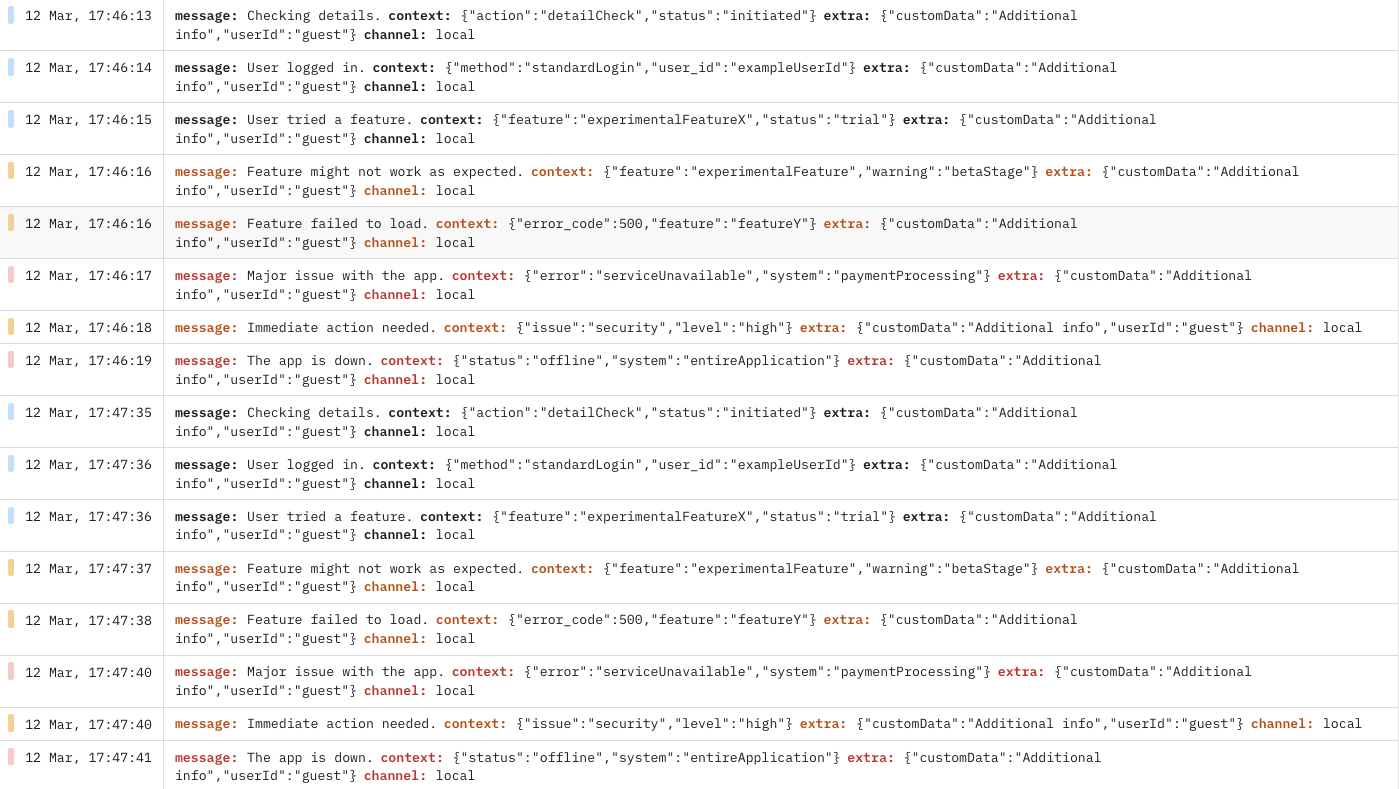
In this section, we will demonstrate the process of verifying that your custom Axiom logger is properly set up and functioning within your Laravel app. To do this, we’ll create a simple test controller with a method designed to send a log message using the Axiom channel. Following this, we’ll define a route that triggers this logging action, allowing you to easily test the logger by accessing a specific URL in your browser or using a tool like cURL.
Create a new controller called `TestController` within your `app/Http/Controllers` directory. In this controller, add a method named `logTest` . This method will use Laravel’s logging to send a test log message to your Axiom dataset. Here’s how you set it up:
```php theme={null}
check() ? auth()->user()->id : 'guest';
return $record;
};
// Get the Monolog instance for the 'axiom' channel and push the custom processor
$logger = Log::channel('axiom')->getLogger();
if ($logger instanceof Logger) {
$logger->pushProcessor($customProcessor);
}
Log::channel('axiom')->debug("Checking details.", ['action' => 'detailCheck', 'status' => 'initiated']);
Log::channel('axiom')->info("User logged in.", ['user_id' => 'exampleUserId', 'method' => 'standardLogin']);
Log::channel('axiom')->info("User tried a feature.", ['feature' => 'experimentalFeatureX', 'status' => 'trial']);
Log::channel('axiom')->warning("Feature might not work as expected.", ['feature' => 'experimentalFeature', 'warning' => 'betaStage']);
Log::channel('axiom')->warning("Feature failed to load.", ['feature' => 'featureY', 'error_code' => 500]);
Log::channel('axiom')->error("Major issue with the app.", ['system' => 'paymentProcessing', 'error' => 'serviceUnavailable']);
Log::channel('axiom')->warning("Immediate action needed.", ['issue' => 'security', 'level' => 'high']);
Log::channel('axiom')->error("The app is down.", ['system' => 'entireApplication', 'status' => 'offline']);
return 'Log messages sent to Axiom';
}
}
```
This method targets the `axiom` channel, which we previously configured to forward logs to your Axiom account. The message **Testing Axiom logger!** should then appear in your Axiom dataset, confirming that the logger is working as expected.
## Registering the route
Next, you need to make this test accessible via a web route. Open your `routes/web.php` file and add a new route that points to the **`logTest`** method in your **`TestController`**. This enables you to trigger the log message by visiting a specific URL in your web browser.
```php theme={null}
 ## Conclusion
This guide has introduced you to integrating Axiom for logging in Laravel apps. You’ve learned how to create a custom logger, configure log channels, and understand the significance of log levels. With this knowledge, you’re set to track errors and analyze log data effectively using Axiom.
## Conclusion
This guide has introduced you to integrating Axiom for logging in Laravel apps. You’ve learned how to create a custom logger, configure log channels, and understand the significance of log levels. With this knowledge, you’re set to track errors and analyze log data effectively using Axiom.