> ## Documentation Index
> Fetch the complete documentation index at: https://axiom.co/docs/llms.txt
> Use this file to discover all available pages before exploring further.
# Axiom CLI
> Learn how to use the Axiom CLI to ingest data, manage authentication state, and configure multiple deployments.
Axiom’s command line interface (CLI) is an Axiom tool that lets you test, manage, and build your Axiom organizations by typing commands on the command-line.
You can use the command line to ingest data, manage authentication state, and configure multiple organizations.
## Installation
### Install using go install
To install Axiom CLI, make sure you have [Go](https://golang.org/dl/) installed, then run this command from any directory in your terminal.
```bash theme={null}
go install github.com/axiomhq/cli/cmd/axiom@latest
```
### Install using Homebrew
You can also install the CLI using [Homebrew](https://brew.sh/)
```bash theme={null}
brew install --cask axiomhq/tap/axiom
```
This installs Axiom command globally so you can run `axiom` commands from any directory.
To update:
```bash theme={null}
brew upgrade --cask axiom
```
### Install from source
```bash theme={null}
git clone https://github.com/axiomhq/cli.git
cd cli
make install # Build and install binary into $GOPATH
```
### Run the Docker image
Docker images are available on [DockerHub.](https://hub.docker.com/r/axiomhq/cli)
```bash theme={null}
docker pull axiomhq/cli
docker run axiomhq/cli
```
You can check the version and find out basic commands about Axiom CLI by running the following command:
```bash theme={null}
axiom
```
## Authentication
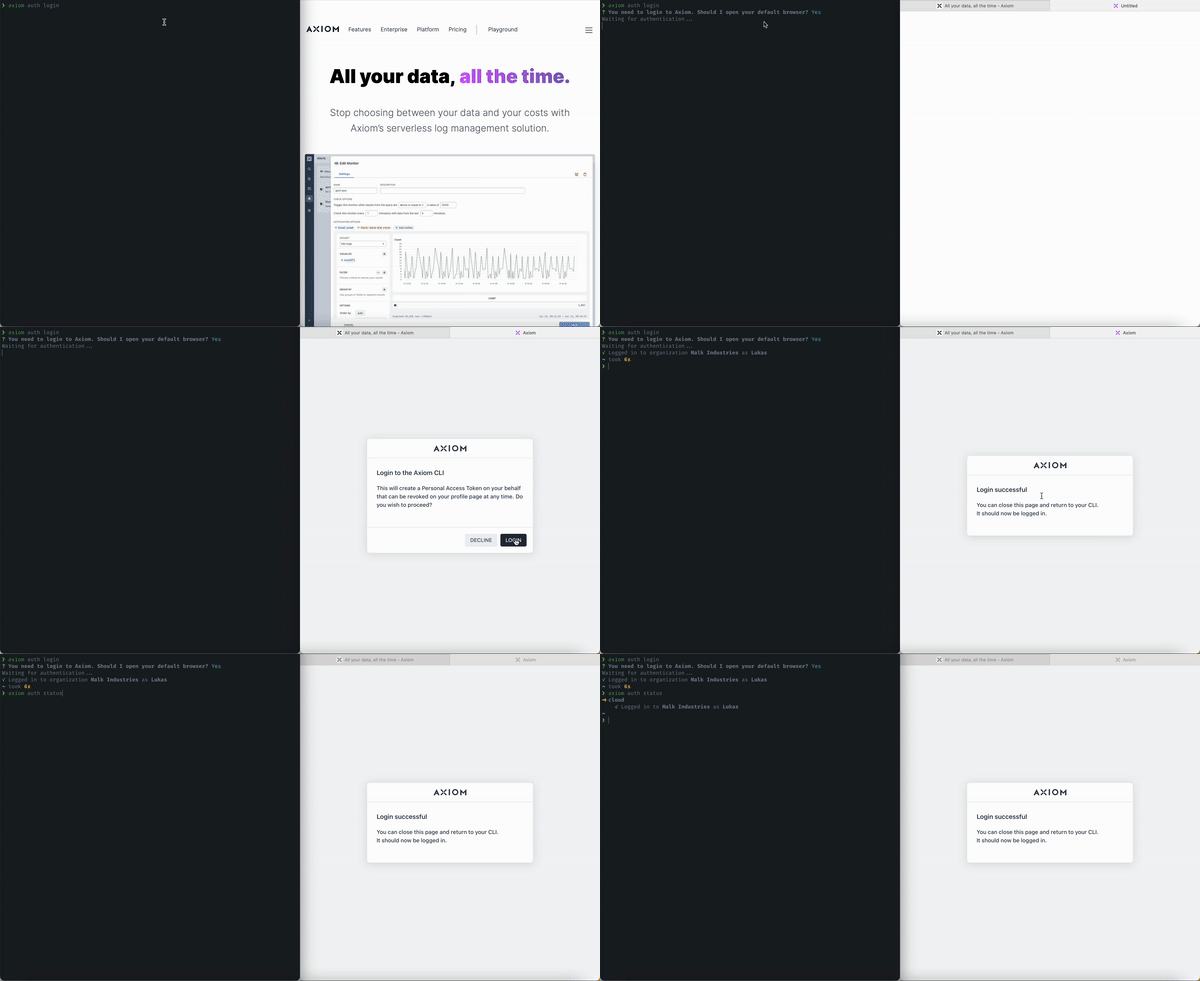
The easiest way to start using Axiom CLI is by logging in through the command line. Simply run `axiom auth login` or simply `axiom` if no prior configuration exists. This will guide you through a straightforward login process.
## Managing multiple organizations
While most users will only need to manage a single Axiom deployment, Axiom CLI provides the capability to switch between multiple organizations for those who require it. You can easily switch between organizations using straightforward CLI commands. For example, `axiom auth switch-org` lets you change your active organization, or you can set the `AXIOM_ORG_ID` environment variable for the same purpose.
Every setting in Axiom CLI can be overwritten via environment variables configured in the `~/.axiom.toml` file. Specifically, `AXIOM_URL`, `AXIOM_TOKEN`, and `AXIOM_ORG_ID` are important for configuring your environment. Set `AXIOM_URL` to your Axiom domain. For more information, see [Edge deployments](/reference/edge-deployments). You can switch between environments using the `axiom auth select` command.
To view available environment variables, run `axiom help environment` for an up to date list of env vars:
```
AXIOM_DEPLOYMENT: The deployment to use. Overwrites the choice loaded
from the configuration file.
AXIOM_ORG_ID: The organization ID of the organization the access
token is valid for.
AXIOM_PAGER, PAGER (in order of precedence): A terminal paging
program to send standard output to, for example, "less".
AXIOM_TOKEN: Token The access token to use. Overwrites the choice
loaded from the configuration file.
AXIOM_URL: The deployment url to use. Overwrites the choice loaded
from the configuration file.
VISUAL, EDITOR (in order of precedence): The editor to use for
authoring text.
NO_COLOR: Set to any value to avoid printing ANSI escape sequences
for color output.
CLICOLOR: Set to "0" to disable printing ANSI colors in output.
CLICOLOR_FORCE: Set to a value other than "0" to keep ANSI colors in
output even when the output is piped.
```
## One-Click Login
The One-Click Login is an easier way to authenticate Axiom-CLI and log in to your Axiom deployments and account resources directly on your terminal using the Axiom CLI.
 ## Tokens
You can generate an ingest and personal token manually in your Axiom user settings.
See [Tokens](/reference/tokens) to know more about managing access and authorization.
## Configuration and Deployment
Axiom CLI lets you ingest, authenticate, and stream data.
For more information about Configuration, managing authentication status, ingesting, streaming, and more,
visit the [Axiom CLI](https://github.com/axiomhq/cli) repository on GitHub.
Axiom CLI supports the ingestion of different formats of data **( JSON, NDJSON, and CSV)**
## Querying
Get deeper insights into your data using [Axiom Processing Language](/apl/introduction)
## Ingestion
Import, transfer, load and process data for later use or storage using the Axiom CLI. With [Axiom CLI](https://github.com/axiomhq/cli) you can Ingest the contents of a **JSON, NDJSON, CSV** logfile into a dataset.
**To view a list of all the available commands run `axiom` on your terminal:**
```bash theme={null}
➜ ~ axiom
The power of Axiom on the command-line.
USAGE
axiom [flags]
CORE COMMANDS
ingest: Ingest structured data
query: Query data using APL
stream: Livestream data
MANAGEMENT COMMANDS
auth: Manage authentication state
config: Manage configuration
dataset: Manage datasets
ADDITIONAL COMMANDS
completion: Generate shell completion scripts
help: Help about any command
version: Print version
web: Open Axiom in the browser
FLAGS
-O, --auth-org-id string Organization ID to use
-T, --auth-token string Token to use
-C, --config string Path to configuration file to use
-D, --deployment string Deployment to use
-h, --help Show help for command
--no-spinner Disable the activity indicator
-v, --version Show axiom version
EXAMPLES
$ axiom auth login
$ axiom version
$ cat http-logs.json | axiom ingest http-logs
AUTHENTICATION
See 'axiom help credentials' for help and guidance on authentication.
ENVIRONMENT VARIABLES
See 'axiom help environment' for the list of supported environment variables.
LEARN MORE
Use 'axiom --help' for more information about a command.
Read the manual at https://axiom.co/reference/cli
```
## Command Reference
Below are the commonly used commands on Axiom CLI
**Core Commands**
| Commands | Description |
| ---------------- | -------------------- |
| **axiom ingest** | Ingest data |
| **axiom query** | Query data using APL |
| **axiom stream** | Live stream data |
**Management Commands**
| Commands | Description |
| --------------------------- | ----------------------------------------- |
| **axiom auth login** | Login to Axiom |
| **axiom auth logout** | Logout of Axiom |
| **axiom auth select** | Select an Axiom environment configuration |
| **axiom auth status** | View authentication status |
| **axiom auth switch-org** | Switch the organization |
| **axiom auth update-token** | Update the token used to authenticate |
| **axiom config edit** | Edit the configuration file |
| **axiom config get** | Get a configuration value |
| **axiom config set** | Set a configuration value |
| **axiom config export** | Export the configuration values |
| **axiom dataset create** | Create a dataset |
| **axiom dataset delete** | Delete a dataset |
| **axiom dataset list** | List all datasets |
| **axiom dataset trim** | Trim a dataset to a given size |
| **axiom dataset update** | Update a dataset |
**Additional Commands**
| Commands | Description |
| ------------------------------- | ----------------------------------------------- |
| **axiom completion bash** | Generate shell completion script for bash |
| **axiom completion fish** | Generate shell completion script for fish |
| **axiom completion powershell** | Generate shell completion script for powershell |
| **axiom completion zsh** | Generate shell completion script for zsh |
| **axiom help** | Help about any command |
| **axiom version** | Print version |
| **axiom web** | Open Axiom in the browser |
## Get help
To get usage tips and learn more about available commands from within Axiom CLI, run the following:
```bash theme={null}
axiom help
```
For more information about a specific command, run `help` with the name of the command.
```bash theme={null}
axiom help auth
```
This also works for sub-commands.
```bash theme={null}
axiom help auth status
```
**if you have questions, or any opinions you can [start an issue](https://github.com/axiomhq/cli/issues) on Axiom CLI’s open source repository.**
**You can also visit our [Discord community](https://axiom.co/discord) to start or join a discussion. We’d love to hear from you!**
## Tokens
You can generate an ingest and personal token manually in your Axiom user settings.
See [Tokens](/reference/tokens) to know more about managing access and authorization.
## Configuration and Deployment
Axiom CLI lets you ingest, authenticate, and stream data.
For more information about Configuration, managing authentication status, ingesting, streaming, and more,
visit the [Axiom CLI](https://github.com/axiomhq/cli) repository on GitHub.
Axiom CLI supports the ingestion of different formats of data **( JSON, NDJSON, and CSV)**
## Querying
Get deeper insights into your data using [Axiom Processing Language](/apl/introduction)
## Ingestion
Import, transfer, load and process data for later use or storage using the Axiom CLI. With [Axiom CLI](https://github.com/axiomhq/cli) you can Ingest the contents of a **JSON, NDJSON, CSV** logfile into a dataset.
**To view a list of all the available commands run `axiom` on your terminal:**
```bash theme={null}
➜ ~ axiom
The power of Axiom on the command-line.
USAGE
axiom [flags]
CORE COMMANDS
ingest: Ingest structured data
query: Query data using APL
stream: Livestream data
MANAGEMENT COMMANDS
auth: Manage authentication state
config: Manage configuration
dataset: Manage datasets
ADDITIONAL COMMANDS
completion: Generate shell completion scripts
help: Help about any command
version: Print version
web: Open Axiom in the browser
FLAGS
-O, --auth-org-id string Organization ID to use
-T, --auth-token string Token to use
-C, --config string Path to configuration file to use
-D, --deployment string Deployment to use
-h, --help Show help for command
--no-spinner Disable the activity indicator
-v, --version Show axiom version
EXAMPLES
$ axiom auth login
$ axiom version
$ cat http-logs.json | axiom ingest http-logs
AUTHENTICATION
See 'axiom help credentials' for help and guidance on authentication.
ENVIRONMENT VARIABLES
See 'axiom help environment' for the list of supported environment variables.
LEARN MORE
Use 'axiom --help' for more information about a command.
Read the manual at https://axiom.co/reference/cli
```
## Command Reference
Below are the commonly used commands on Axiom CLI
**Core Commands**
| Commands | Description |
| ---------------- | -------------------- |
| **axiom ingest** | Ingest data |
| **axiom query** | Query data using APL |
| **axiom stream** | Live stream data |
**Management Commands**
| Commands | Description |
| --------------------------- | ----------------------------------------- |
| **axiom auth login** | Login to Axiom |
| **axiom auth logout** | Logout of Axiom |
| **axiom auth select** | Select an Axiom environment configuration |
| **axiom auth status** | View authentication status |
| **axiom auth switch-org** | Switch the organization |
| **axiom auth update-token** | Update the token used to authenticate |
| **axiom config edit** | Edit the configuration file |
| **axiom config get** | Get a configuration value |
| **axiom config set** | Set a configuration value |
| **axiom config export** | Export the configuration values |
| **axiom dataset create** | Create a dataset |
| **axiom dataset delete** | Delete a dataset |
| **axiom dataset list** | List all datasets |
| **axiom dataset trim** | Trim a dataset to a given size |
| **axiom dataset update** | Update a dataset |
**Additional Commands**
| Commands | Description |
| ------------------------------- | ----------------------------------------------- |
| **axiom completion bash** | Generate shell completion script for bash |
| **axiom completion fish** | Generate shell completion script for fish |
| **axiom completion powershell** | Generate shell completion script for powershell |
| **axiom completion zsh** | Generate shell completion script for zsh |
| **axiom help** | Help about any command |
| **axiom version** | Print version |
| **axiom web** | Open Axiom in the browser |
## Get help
To get usage tips and learn more about available commands from within Axiom CLI, run the following:
```bash theme={null}
axiom help
```
For more information about a specific command, run `help` with the name of the command.
```bash theme={null}
axiom help auth
```
This also works for sub-commands.
```bash theme={null}
axiom help auth status
```
**if you have questions, or any opinions you can [start an issue](https://github.com/axiomhq/cli/issues) on Axiom CLI’s open source repository.**
**You can also visit our [Discord community](https://axiom.co/discord) to start or join a discussion. We’d love to hear from you!**