# Send OpenAI Agents SDK traces to Axiom
The OpenAI Agents SDK records a trace for every agent run, with spans for agents, model calls, and tool calls. By default, the SDK sends these traces to the OpenAI Traces dashboard. This page explains how to send them to Axiom over OpenTelemetry instead, so that each run appears in Axiom’s AI trace waterfall view and GenAI dashboard.
The Agents SDK lets you register custom tracing processors that receive every trace and span. The setups on this page use that interface to turn Agents SDK spans into OpenTelemetry spans that follow the [GenAI semantic conventions](https://opentelemetry.io/docs/specs/semconv/gen-ai/gen-ai-agent-spans/), and export them to Axiom over OTLP/HTTP:
* **Python**: The OpenTelemetry project’s [`opentelemetry-instrumentation-genai-openai-agents`](https://pypi.org/project/opentelemetry-instrumentation-genai-openai-agents/) package registers the tracing processor. Together with [`opentelemetry-instrumentation-genai-openai`](https://pypi.org/project/opentelemetry-instrumentation-genai-openai/), which creates the model call spans, it produces a complete trace for each run.
* **TypeScript**: A short tracing processor that you add to your project. It uses the Agents SDK’s public `TracingProcessor` interface and the OpenTelemetry JavaScript SDK.
OpenTelemetry also publishes [`@opentelemetry/instrumentation-openai-agents`](https://github.com/open-telemetry/opentelemetry-js-contrib/tree/main/packages/instrumentation-openai-agents) for TypeScript. It creates agent and tool spans but no model call spans. Model call spans from `@opentelemetry/instrumentation-openai` start a separate trace, and that package supports `openai` versions below 7, while current versions of `@openai/agents` depend on `openai` 7. Without model call spans, the GenAI dashboard has no model or token usage data, so this page uses a custom tracing processor for TypeScript.
## Prerequisites [#prerequisites]
* [Create an Axiom account](https://app.axiom.co/register).
* [Create a dataset in Axiom](/reference/datasets#create-dataset) where you send your traces.
* [Create an API token in Axiom](/reference/tokens) with permissions to ingest data to the dataset you have created.
* An app that uses the [OpenAI Agents SDK for Python](https://openai.github.io/openai-agents-python/) or the [OpenAI Agents SDK for TypeScript](https://openai.github.io/openai-agents-js/), and an OpenAI API key.
## What Axiom receives [#what-axiom-receives]
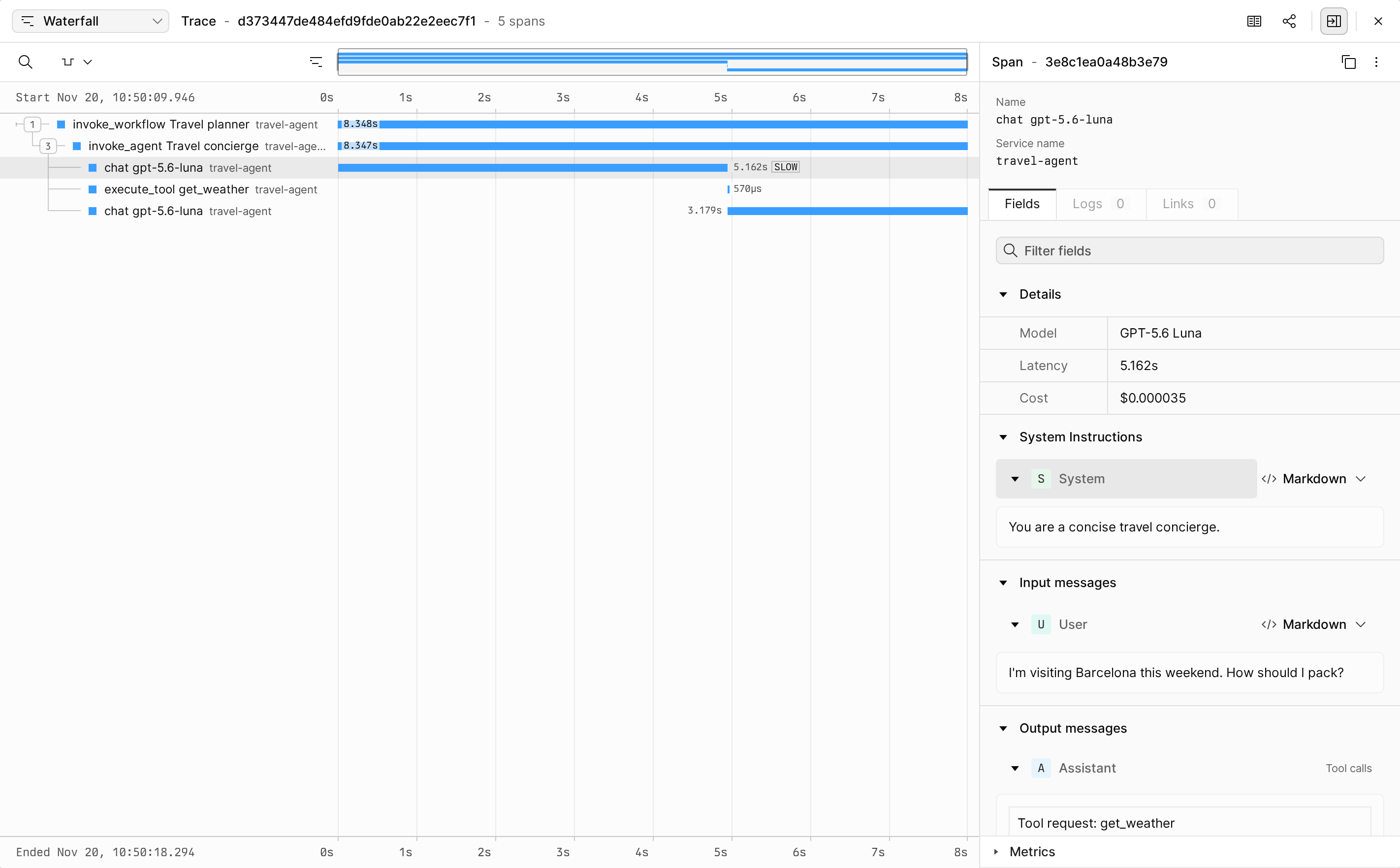
Both setups produce the same span structure. Each agent run becomes one trace:
| Agents SDK span | OpenTelemetry span name | `gen_ai.operation.name` |
| :--------------------------------------- | :------------------------------ | :---------------------- |
| Trace of the run | `invoke_workflow WORKFLOW_NAME` | `invoke_workflow` |
| Agent span | `invoke_agent AGENT_NAME` | `invoke_agent` |
| Model call (response or generation span) | `chat MODEL_NAME` | `chat` |
| Function tool span | `execute_tool TOOL_NAME` | `execute_tool` |
Model call spans include the model name, the response ID, and the input and output token counts in `gen_ai.request.model`, `gen_ai.response.model`, `gen_ai.response.id`, `gen_ai.usage.input_tokens`, and `gen_ai.usage.output_tokens`. When you capture content, model call spans also include the conversation in `gen_ai.input.messages` and `gen_ai.output.messages`, and tool spans include the tool arguments and result in `gen_ai.tool.call.arguments` and `gen_ai.tool.call.result`.
Neither setup exports task, turn, guardrail, handoff, or custom spans as separate spans. Spans nested inside them appear under the closest exported parent.
For more information about these attributes, see [GenAI attributes](/use-cases/llm-observability/gen-ai-attributes) and [Manual instrumentation](/use-cases/llm-observability/manual-instrumentation).
## Send traces from Python [#send-traces-from-python]
The Python setup requires Python 3.10 or later and `openai-agents` 0.3.3 or later, below version 1.
### Install packages [#install-packages]
```bash
pip install openai-agents \
opentelemetry-sdk \
opentelemetry-exporter-otlp-proto-http \
opentelemetry-instrumentation-genai-openai-agents \
opentelemetry-instrumentation-genai-openai
```
The two instrumentation packages are in beta.
### Configure the exporter [#configure-the-exporter]
Configure OpenTelemetry once when your app starts, before you run an agent. The following example is a complete script:
```python main.py
from agents import Agent, RunConfig, Runner, function_tool
from opentelemetry import trace
from opentelemetry.exporter.otlp.proto.http.trace_exporter import OTLPSpanExporter
from opentelemetry.instrumentation.genai.openai import OpenAIInstrumentor
from opentelemetry.instrumentation.genai.openai_agents import OpenAIAgentsInstrumentor
from opentelemetry.sdk.resources import Resource
from opentelemetry.sdk.trace import TracerProvider
from opentelemetry.sdk.trace.export import BatchSpanProcessor
# Send spans to Axiom over OTLP/HTTP
provider = TracerProvider(resource=Resource.create({"service.name": "travel-agent"}))
provider.add_span_processor(
BatchSpanProcessor(
OTLPSpanExporter(
endpoint="https://AXIOM_DOMAIN/v1/traces",
headers={
"Authorization": "Bearer API_TOKEN",
"X-Axiom-Dataset": "DATASET_NAME",
},
)
)
)
trace.set_tracer_provider(provider)
# Create chat spans for model calls
OpenAIInstrumentor().instrument()
# Create agent and tool spans, and stop sending traces to OpenAI
OpenAIAgentsInstrumentor().instrument(disable_openai_trace_export=True)
@function_tool
def get_weather(city: str) -> str:
return f"The forecast for {city} is sunny."
agent = Agent(
name="Travel concierge",
instructions="You are a concise travel concierge.",
tools=[get_weather],
)
result = Runner.run_sync(
agent,
"I'm visiting Barcelona this weekend. How should I pack?",
run_config=RunConfig(workflow_name="Travel planner"),
)
print(result.final_output)
# Export buffered spans before the process exits
provider.shutdown()
```
The example does the following:
* `OTLPSpanExporter` sends spans to the `/v1/traces` endpoint of your edge deployment using HTTP with Protobuf encoding.
* `OpenAIInstrumentor` creates a `chat` span for each call the OpenAI Python client makes, including calls to the Responses API that the Agents SDK uses by default.
* `OpenAIAgentsInstrumentor` registers a tracing processor with the Agents SDK and creates the workflow, agent, and tool spans. Model call spans nest under the agent span that made the call.
* `RunConfig(workflow_name=...)` sets the name of the workflow span. Without it, the Agents SDK names traces `Agent workflow`.
* `provider.shutdown()` exports the remaining spans before the script exits. In a long-running service, call it when the service shuts down. `BatchSpanProcessor` exports spans in the background while the service runs.
### Keep or stop sending traces to OpenAI [#keep-or-stop-sending-traces-to-openai]
By default, `OpenAIAgentsInstrumentor().instrument()` adds its processor next to the Agents SDK’s default exporter, so traces go to both Axiom and the OpenAI Traces dashboard. The example passes `disable_openai_trace_export=True` to replace the default exporter and send traces only to Axiom. Remove that argument to keep both destinations.
### Capture prompts and responses [#capture-prompts-and-responses]
By default, the OpenTelemetry instrumentation doesn’t capture message content. Spans include models, token counts, and tool names, but no prompts, responses, tool arguments, or tool results.
To view conversations in Axiom, set the following environment variable before you start your app:
```bash
export OTEL_INSTRUMENTATION_GENAI_CAPTURE_MESSAGE_CONTENT=span_only
```
Possible values are `span_only`, `event_only`, `span_and_event`, and `no_content`. Axiom’s conversation view reads content from span attributes, so use `span_only` or `span_and_event`.
Prompts, responses, and tool results can contain personal or confidential data. Capture content only if you need it, and consider [redaction policies](/use-cases/llm-observability/redaction-policies) for the data you send to Axiom.
### Limitations [#limitations]
`OpenAIInstrumentor` only creates spans for calls made with the OpenAI Python client. This includes OpenAI-compatible endpoints that you call through that client. If an agent uses a model through another client, for example with the LiteLLM extension, the trace contains workflow, agent, and tool spans but no `chat` spans for that model.
## Send traces from TypeScript [#send-traces-from-typescript]
The TypeScript setup uses the `@openai/agents` package and requires a Node.js version that runs TypeScript files natively, such as Node.js 24. If you compile TypeScript first, remove the `.ts` extension from local imports.
### Install packages [#install-packages-1]
```bash
npm install @openai/agents zod \
@opentelemetry/api \
@opentelemetry/sdk-trace \
@opentelemetry/resources \
@opentelemetry/exporter-trace-otlp-proto
```
The examples use top-level `await`, so set `"type": "module"` in your `package.json` file.
### Add the tracing processor [#add-the-tracing-processor]
Create a file named `axiom-tracing.ts` with the following content. The processor creates an OpenTelemetry span for each Agents SDK span listed in [What Axiom receives](#what-axiom-receives) and nests it under the matching parent.
```ts axiom-tracing.ts expandable
import type { Span as AgentsSpan, Trace, TracingProcessor } from '@openai/agents';
import { context, SpanKind, SpanStatusCode, trace, type Span, type Tracer } from '@opentelemetry/api';
type Message = { role: string; parts: Record[]; finish_reason?: string };
// Convert Agents SDK items, Responses API items, and Chat Completions messages to OpenTelemetry GenAI messages
function toMessages(items: unknown): Message[] {
if (typeof items === 'string') return [{ role: 'user', parts: [{ type: 'text', content: items }] }];
if (!Array.isArray(items)) return [];
const messages: Message[] = [];
for (const item of items) {
// The Agents SDK uses `callId` and `function_call_result`, the Responses API uses `call_id` and `function_call_output`
const id = item.call_id ?? item.callId;
if (item.type === 'function_call') {
messages.push({ role: 'assistant', parts: [{ type: 'tool_call', id, name: item.name, arguments: item.arguments }] });
} else if (item.type === 'function_call_output' || item.type === 'function_call_result') {
const output = item.output;
const response = typeof output === 'string' ? output : typeof output?.text === 'string' ? output.text : JSON.stringify(output);
messages.push({ role: 'tool', parts: [{ type: 'tool_call_response', id, response }] });
} else if (item.role) {
const content = typeof item.content === 'string' ? [{ text: item.content }] : (item.content ?? []);
const parts: Record[] = content
.filter((c: any) => typeof c.text === 'string')
.map((c: any) => ({ type: 'text', content: c.text }));
for (const call of item.tool_calls ?? []) {
parts.push({ type: 'tool_call', id: call.id, name: call.function?.name, arguments: call.function?.arguments });
}
messages.push({ role: item.role, parts });
}
}
return messages;
}
function attributesFor(span: AgentsSpan): [string, Record, SpanKind] | undefined {
const data = span.spanData;
switch (data.type) {
case 'agent':
return [`invoke_agent ${data.name}`, { 'gen_ai.operation.name': 'invoke_agent', 'gen_ai.agent.name': data.name }, SpanKind.INTERNAL];
case 'function':
return [`execute_tool ${data.name}`, {
'gen_ai.operation.name': 'execute_tool',
'gen_ai.tool.name': data.name,
'gen_ai.tool.type': 'function',
'gen_ai.tool.call.arguments': data.input,
'gen_ai.tool.call.result': data.output,
}, SpanKind.INTERNAL];
case 'response': {
// Model calls through the Responses API, the SDK default
const response = data._response;
const output = toMessages(response?.output);
if (output.length) output[output.length - 1].finish_reason = output.some((m) => m.parts.some((p) => p.type === 'tool_call')) ? 'tool_call' : 'stop';
return [`chat ${response?.model ?? ''}`.trim(), {
'gen_ai.operation.name': 'chat',
'gen_ai.provider.name': 'openai',
'gen_ai.request.model': response?.model,
'gen_ai.response.model': response?.model,
'gen_ai.response.id': data.response_id ?? response?.id,
'gen_ai.usage.input_tokens': response?.usage?.input_tokens,
'gen_ai.usage.output_tokens': response?.usage?.output_tokens,
'gen_ai.input.messages': data._input ? JSON.stringify(toMessages(data._input)) : undefined,
'gen_ai.output.messages': output.length ? JSON.stringify(output) : undefined,
}, SpanKind.CLIENT];
}
case 'generation':
// Model calls through Chat Completions and other model providers
return [`chat ${data.model ?? ''}`.trim(), {
'gen_ai.operation.name': 'chat',
'gen_ai.request.model': data.model,
'gen_ai.response.model': data.model,
'gen_ai.usage.input_tokens': data.usage?.input_tokens,
'gen_ai.usage.output_tokens': data.usage?.output_tokens,
'gen_ai.input.messages': data.input ? JSON.stringify(toMessages(data.input)) : undefined,
'gen_ai.output.messages': data.output ? JSON.stringify(toMessages(data.output)) : undefined,
}, SpanKind.CLIENT];
default:
return undefined;
}
}
// Turns Agents SDK traces and spans into OpenTelemetry spans
export class AxiomTracingProcessor implements TracingProcessor {
#spans = new Map();
#tracer: Tracer;
constructor(tracer: Tracer) {
this.#tracer = tracer;
}
async onTraceStart(t: Trace) {
this.#spans.set(t.traceId, this.#tracer.startSpan(`invoke_workflow ${t.name}`, {
attributes: { 'gen_ai.operation.name': 'invoke_workflow', 'gen_ai.workflow.name': t.name, 'gen_ai.conversation.id': t.groupId ?? undefined },
}));
}
async onTraceEnd(t: Trace) {
this.#spans.get(t.traceId)?.end();
this.#spans.delete(t.traceId);
}
async onSpanStart(span: AgentsSpan) {
const parent = this.#spans.get(span.parentId ?? span.traceId) ?? this.#spans.get(span.traceId);
if (!parent) return;
const known = attributesFor(span);
// Keep spans this processor doesn't map, such as turns and guardrails, as parents without exporting them
if (!known) {
this.#spans.set(span.spanId, parent);
return;
}
const ctx = trace.setSpan(context.active(), parent);
const startTime = span.startedAt ? new Date(span.startedAt) : undefined;
this.#spans.set(span.spanId, this.#tracer.startSpan(known[0], { kind: known[2], startTime }, ctx));
}
async onSpanEnd(span: AgentsSpan) {
const otelSpan = this.#spans.get(span.spanId);
this.#spans.delete(span.spanId);
const known = attributesFor(span);
if (!otelSpan || !known) return;
// Model and tool data is available when the span ends
otelSpan.updateName(known[0]);
for (const [key, value] of Object.entries(known[1])) {
if (value !== undefined && value !== null && value !== '') otelSpan.setAttribute(key, value);
}
if (span.error) {
otelSpan.setStatus({ code: SpanStatusCode.ERROR, message: span.error.message });
}
otelSpan.end(span.endedAt ? new Date(span.endedAt) : undefined);
}
async shutdown() {}
async forceFlush() {}
}
```
### Configure the exporter [#configure-the-exporter-1]
Create a file named `instrumentation.ts` with the following content:
```ts instrumentation.ts
import { setTraceProcessors } from '@openai/agents';
import { OTLPTraceExporter } from '@opentelemetry/exporter-trace-otlp-proto';
import { resourceFromAttributes } from '@opentelemetry/resources';
import { BatchSpanProcessor, TracerProvider } from '@opentelemetry/sdk-trace';
import { AxiomTracingProcessor } from './axiom-tracing.ts';
// Send spans to Axiom over OTLP/HTTP
export const tracerProvider = new TracerProvider({
resource: resourceFromAttributes({ 'service.name': 'travel-agent' }),
spanProcessors: [
new BatchSpanProcessor({
exporter: new OTLPTraceExporter({
url: 'https://AXIOM_DOMAIN/v1/traces',
headers: {
Authorization: 'Bearer API_TOKEN',
'X-Axiom-Dataset': 'DATASET_NAME',
},
}),
}),
],
});
// Replace the default OpenAI exporter with the Axiom processor
setTraceProcessors([new AxiomTracingProcessor(tracerProvider.getTracer('openai-agents'))]);
```
`setTraceProcessors` replaces the Agents SDK’s default exporter, so traces go only to Axiom. To send traces to both Axiom and the OpenAI Traces dashboard, call `addTraceProcessor` with the same argument instead.
### Run an agent [#run-an-agent]
Import `instrumentation.ts` before you run an agent. The following example is a complete script:
```ts agent.ts
import { tracerProvider } from './instrumentation.ts';
import { Agent, getGlobalTraceProvider, Runner, tool } from '@openai/agents';
import { z } from 'zod';
const getWeather = tool({
name: 'get_weather',
description: 'Get the weather for a city',
parameters: z.object({ city: z.string() }),
execute: async ({ city }) => `The forecast for ${city} is sunny.`,
});
const agent = new Agent({
name: 'Travel concierge',
instructions: 'You are a concise travel concierge.',
tools: [getWeather],
});
const runner = new Runner({ workflowName: 'Travel planner' });
const result = await runner.run(agent, "I'm visiting Barcelona this weekend. How should I pack?");
console.log(result.finalOutput);
// Export buffered spans before the process exits
await getGlobalTraceProvider().forceFlush();
await tracerProvider.shutdown();
```
Run the script with `node agent.ts`.
The example does the following:
* `new Runner({ workflowName })` sets the name of the workflow span. Without it, the Agents SDK names traces `Agent workflow`.
* `getGlobalTraceProvider().forceFlush()` and `tracerProvider.shutdown()` export the remaining spans before the script exits. In a long-running service, call them when the service shuts down. In runtimes without a background export loop, such as Cloudflare Workers, call them at the end of each request. For more information, see [Export loop lifecycle](https://openai.github.io/openai-agents-js/guides/tracing/#export-loop-lifecycle) in the Agents SDK documentation.
### Capture prompts and responses [#capture-prompts-and-responses-1]
The processor exports the data that the Agents SDK records. By default, the Agents SDK includes prompts, responses, tool arguments, and tool results in its spans.
To stop capturing this content, set `traceIncludeSensitiveData: false` in the [run configuration](https://openai.github.io/openai-agents-js/openai/agents-core/type-aliases/runconfig/#traceincludesensitivedata):
```ts
const runner = new Runner({ workflowName: 'Travel planner', traceIncludeSensitiveData: false });
```
With this setting, the Agents SDK also leaves the model name and token counts out of its spans for Responses API calls. Model call spans in Axiom then contain only `gen_ai.operation.name` and `gen_ai.provider.name`, and the GenAI dashboard shows no model or token usage data for them.
Prompts, responses, and tool results can contain personal or confidential data. Capture content only if you need it, and consider [redaction policies](/use-cases/llm-observability/redaction-policies) for the data you send to Axiom.
## View traces in Axiom [#view-traces-in-axiom]
After your app runs an agent, Axiom shows the traces in the following places:
* **GenAI dashboard**: Axiom creates the dashboard automatically when `attributes.gen_ai.operation.name` is present in your dataset. Click the **Dashboards** tab, and then click **Generative AI Overview (DATASET\_NAME)**. The dashboard shows requests by operation and agent, token usage and cost, errors, and a comparison of models.
* **AI trace waterfall view**: Click the **Query** tab, run a query on your dataset, and then click a trace ID. The waterfall shows the workflow, agent, model call, and tool spans of the run. Click a model call span to see its model, latency, cost, and messages.
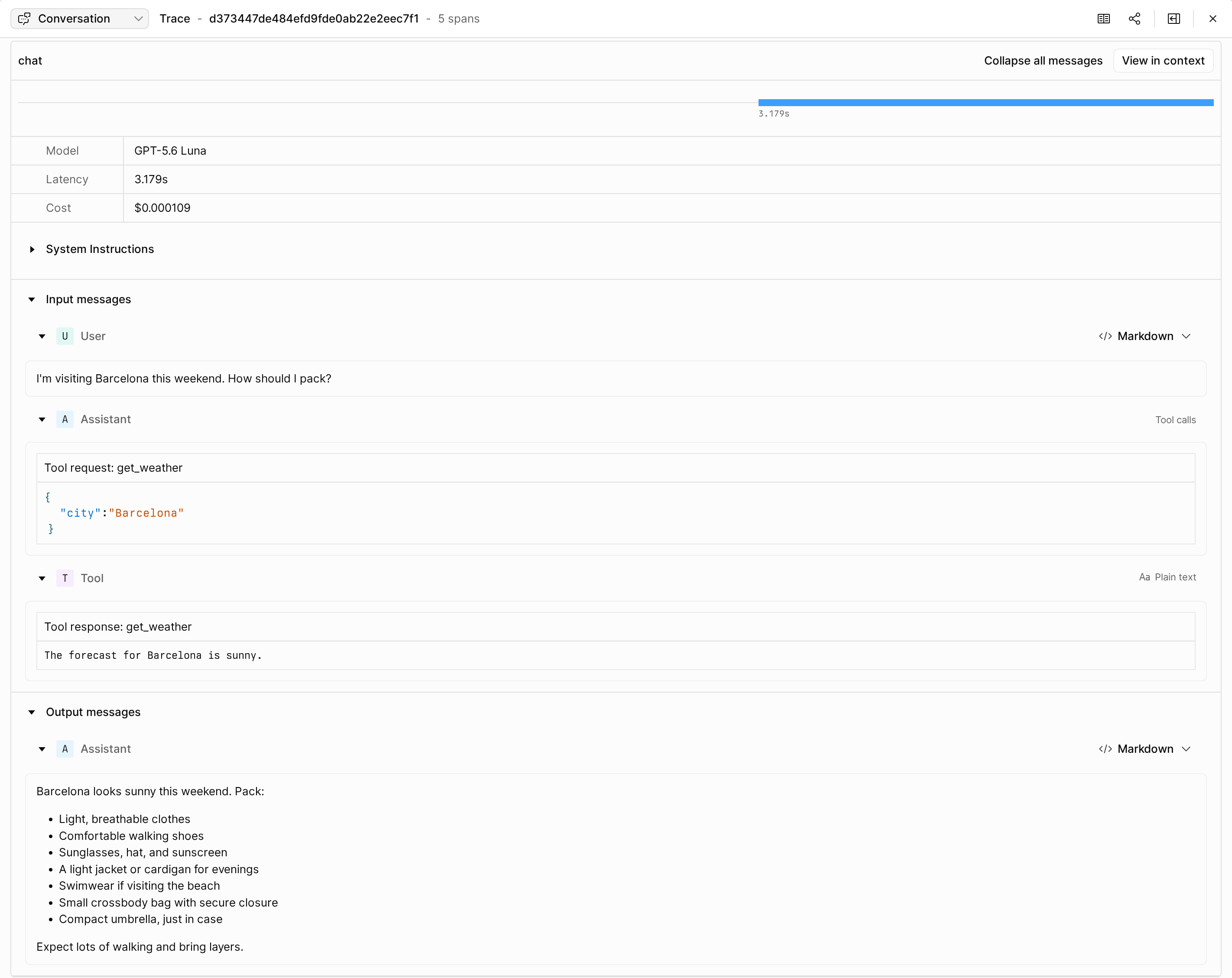
 If you capture content, select the **Conversation** view from the menu at the top left to read the prompts, tool calls, tool results, and responses of each model call.
 For more information, see [LLM observability](/use-cases/llm-observability#visualize-traces-in-console).
To find model calls, run the following query:
```kusto
['DATASET_NAME']
| where ['attributes.gen_ai.operation.name'] == "chat"
```
To estimate the cost of model calls per agent run, combine the token counts with the [genai\_cost](/apl/scalar-functions/genai-functions/genai-cost) function:
```kusto
['DATASET_NAME']
| where ['attributes.gen_ai.operation.name'] == "chat"
| extend model = ['attributes.gen_ai.response.model']
| extend input_tokens = tolong(['attributes.gen_ai.usage.input_tokens'])
| extend output_tokens = tolong(['attributes.gen_ai.usage.output_tokens'])
| extend cost = genai_cost(model, input_tokens, output_tokens)
| summarize total_cost = sum(cost), total_input_tokens = sum(input_tokens), total_output_tokens = sum(output_tokens) by trace_id
```
Replace `DATASET_NAME` with the name of your Axiom dataset.
## What’s next? [#whats-next]
* Learn about the [GenAI attributes](/use-cases/llm-observability/gen-ai-attributes) that Axiom recognizes.
* Use [GenAI APL functions](/apl/scalar-functions/genai-functions) to query your agent traces.
* Set up [monitors](/monitor-data/monitors) to get alerts on errors or token usage.
* For more information about tracing in the Agents SDK, see [Tracing](https://openai.github.io/openai-agents-python/tracing/) for Python and [Tracing](https://openai.github.io/openai-agents-js/guides/tracing/) for TypeScript in the OpenAI documentation.