
A Splunk license is usually described as a data budget, but in practice it’s really a budget on questions and insights.
What that budget buys is genuinely good in many ways. SPL is expressive, search-time field extraction handles messy data without deciding every field at ingest, and twenty years of saved searches, dashboards and detections encode how a company actually investigates.
That operating layer is worth a fortune, but the data plane underneath it is what costs one, and its price draws a hard line that defines where a source stops being worth indexing. Below that line sit the noisy, high-volume, occasionally decisive things: the firewall logs, the debug tier, the CDN records, the thing the new team shipped last month. Those sources go to object storage or an archive instead, which is cheap and which is not the same as keeping them. Nothing there is live. Answering a question means filing a restore, waiting for it to rehydrate, and hoping you scoped the window correctly. In the middle of an investigation, that is indistinguishable from not having the data at all.
If you run a Splunk estate measured in terabytes a day, none of this is news to you. It's a coverage problem you already own, and you've probably already priced the alternatives: rip and replace, stand up a second store, or run your own cluster.
Today we’re releasing a new option, in two parts:
Axiom Portal for Splunk puts Axiom datasets in your index list, so ordinary SPL reaches them.
The Axiom for Splunk App puts eight commands in your search bar, for practitioners who want to address Axiom explicitly.
Neither copies data into Splunk, and both run at search time, so neither consumes Splunk ingest license.
Axiom holds and queries the machine data. Splunk remains the operating layer for the searches, dashboards, detections, and investigations your teams have built. Compared with known Splunk pricing at petabyte scale, running the data plane on Axiom can reduce its cost by over 90%, reached from the Splunk you already run. Your dashboards, saved searches, lookups and alerts do not change, because nothing about them has to.
In the index list, or in the search bar
Which one you want depends on who's asking. The Portal is plumbing a platform owner sets up once, after which every analyst reaches Axiom data without needing to know it is there. The App is for a Splunk power user with a question in front of them right now, and one engineer can install it themselves. Most estates will end up with both.
The Portal: Axiom in your index list
The Portal changes what your analysts can reach without changing what they have to do to get there. No new query language, no second interface, no retraining on anyone's roadmap. The people using Splunk today keep using Splunk exactly as they do now, and the data underneath them gets deeper and faster. You can meet an estate-wide goal without disturbing a single person.
Splunk already has a protocol for this. Federated Search for Splunk is how one Splunk deployment searches another, and Axiom Portal for Splunk implements the provider side of it, so Axiom datasets arrive in the search head as indexes and ordinary SPL reaches them. Nothing installs on the search head.
Two modes
Standard | Transparent | |
|---|---|---|
An Axiom dataset appears as |
|
|
Splunk edition | Every edition, including Splunk Cloud Platform (standard mode, Victoria Experience) | Splunk Enterprise 9.0 through 10.4 |
Lookups and data models | Stay in Splunk | Replicate to Axiom and come across |
Setup | Point a search head at the Portal | Same, plus knowledge bundle replication |
In transparent mode you change the index name to whatever the dataset is called in Axiom, and that's the migration. The compatibility page details command coverage and edition support in full.
The work happens next to the data. Filters and aggregations compile to APL and run inside Axiom, and results come back in Splunk's own partial-result form so the search head does the final merge itself. A stats count over a billion events sends a handful of rows back, not a billion. Filters, stats, and timecharts are exact at any size rather than sampled, because Splunk is merging real partials rather than trusting an estimate.
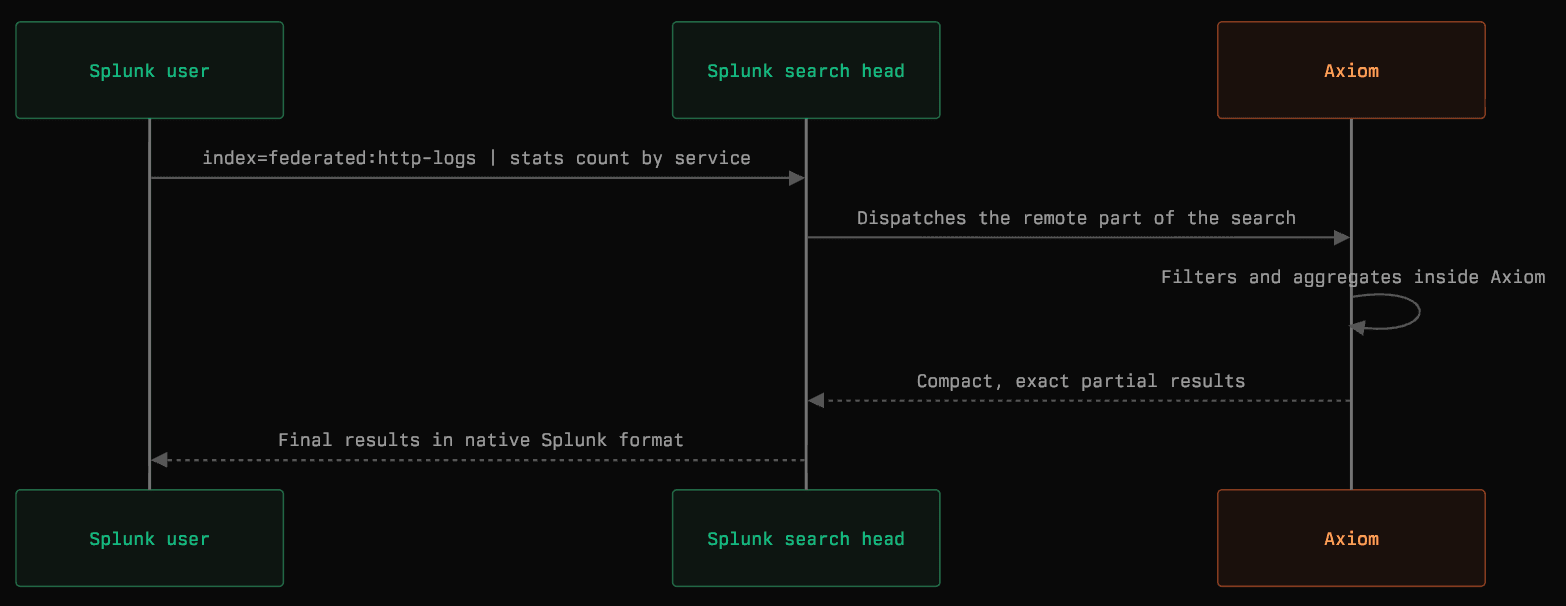
Splunk dispatches the work, Axiom runs it, and exact partial results come back in Splunk's native format.
Splunk dispatches the work, Axiom runs it, and exact partial results come back in Splunk's native format.
What changes. Data behind the federated seam isn't archived and it isn't a copy: it's live, it's exact, and it's reachable from the search bar your analysts already have open. Sources that were never worth a license become ordinary indexes, and the license stops setting the boundary of what anyone can ask.
Nobody has to move. Teams who live in Splunk go on living in Splunk. Some of that will drift over time, particularly as more of the querying is done by agents than by people, and our MCP server is there when it does. But that's each team's choice on its own schedule, and none of it is a precondition for the data landing.
The App: Axiom in your search bar
Install it from Splunkbase, paste an Axiom API token and hit Connect. The App checks the token can list your datasets and run a query before it enables itself.
That gives you eight ax commands, which run like any other SPL command:
Three orient you:
axdatasetslists what your token can see,axfieldsshows a dataset's schema, andaxsamplepulls recent events straight into Splunk with no APL at all.
Three push work into Axiom:
axsearchtakes a Splunk-style query and compiles it to APL,axstatshands Splunk back a summary table that charts like any other result, andaxtimechartreturns a chartable time series.explain=truecan be added to any of the three and it shows you exactly what it will run before it runs it.
The last two cross the seam in the other direction:
axlookupjoins live Axiom fields onto events already in Splunk, so a Splunk event can carry context it never had, andaxqueryruns APL directly, for people who want that.
Around the commands, the App tries to answer the questions you have when something is actually going wrong. Workflow actions put "search this trace, this service, this deployment in Axiom" into the event menu, so one click pulls the whole trace live. An Explore tab lists every dataset your token can see, with its schema and a query to start from. And a Debug tab logs every run the App makes, failures flagged, with timings and the full trail, because a bridge you can't inspect is a bridge you won't trust.
More of the evidence inside every investigation
The point of both products is what an analyst can reach without paying Splunk ingest pricing as the cost of admission.
Recent events and older history sit in the same active query path. Axiom keeps older data economically on object storage, ready to query with no restore, promotion, or re-indexing step. It searches hundreds of billions of events and returns exact answers in seconds, and commonly reduces the physical footprint of machine data by more than 95 percent. A field that becomes important months later is still there and ready to query.
What it looks like
In transparent mode, an Axiom dataset called http-logs is just an index:
Ordinary SPL. The filter and the aggregation ran inside Axiom, over however much data you kept, and Splunk merged the result.
An analyst opens a dashboard, follows a question into a source that was never worth licensing, and the trail doesn't stop. The panels built on indexed data behave exactly as they did last week. Nobody had to learn anything for the new ones to work.
Getting started
Thousands of organizations already run their machine data on Axiom, the telemetry behind their products and operations. Axiom for Spunk brings that data plane into Splunk.
Axiom already supports HEC, so if you already run Cribl, a heavy forwarder or a Kafka consumer, teeing a stream across is a configuration change rather than a project. Start with the noisiest one you have. Nothing downstream will notice.
Proof can start with one workload. The leverage grows as the model extends across the estate, and across a large, multi-year contract the difference can run into millions. That is a different answer to bring to your next Splunk renewal.
The fastest way to find out what that is worth on your estate is to talk to us. Bring your volumes, your renewal date and the workload you would test first, and we will show you both products running against data shaped like yours.
But if you'd rather explore on your own, you can. For the Portal, point a search head at splunk.portal.axiom.co and add an Axiom API token with query permissions, on any Axiom plan. Queries run under Splunk's own RBAC, so a user who can't see an index can't see the Axiom data behind it. Revoke the token and access ends. Remove the provider and there's nothing to clean up afterwards, because no copy of your data was ever made.
The App installs from Splunkbase, or from source as an AppInspect-passing private app on Splunk Cloud.
This is the first breakdown we're publishing about our Splunk App and Portal. Over the next few weeks, we’ll follow up with why we built it, and then how, including what it takes to make a Splunk search head believe you.