GenAI functions are now available in APL.
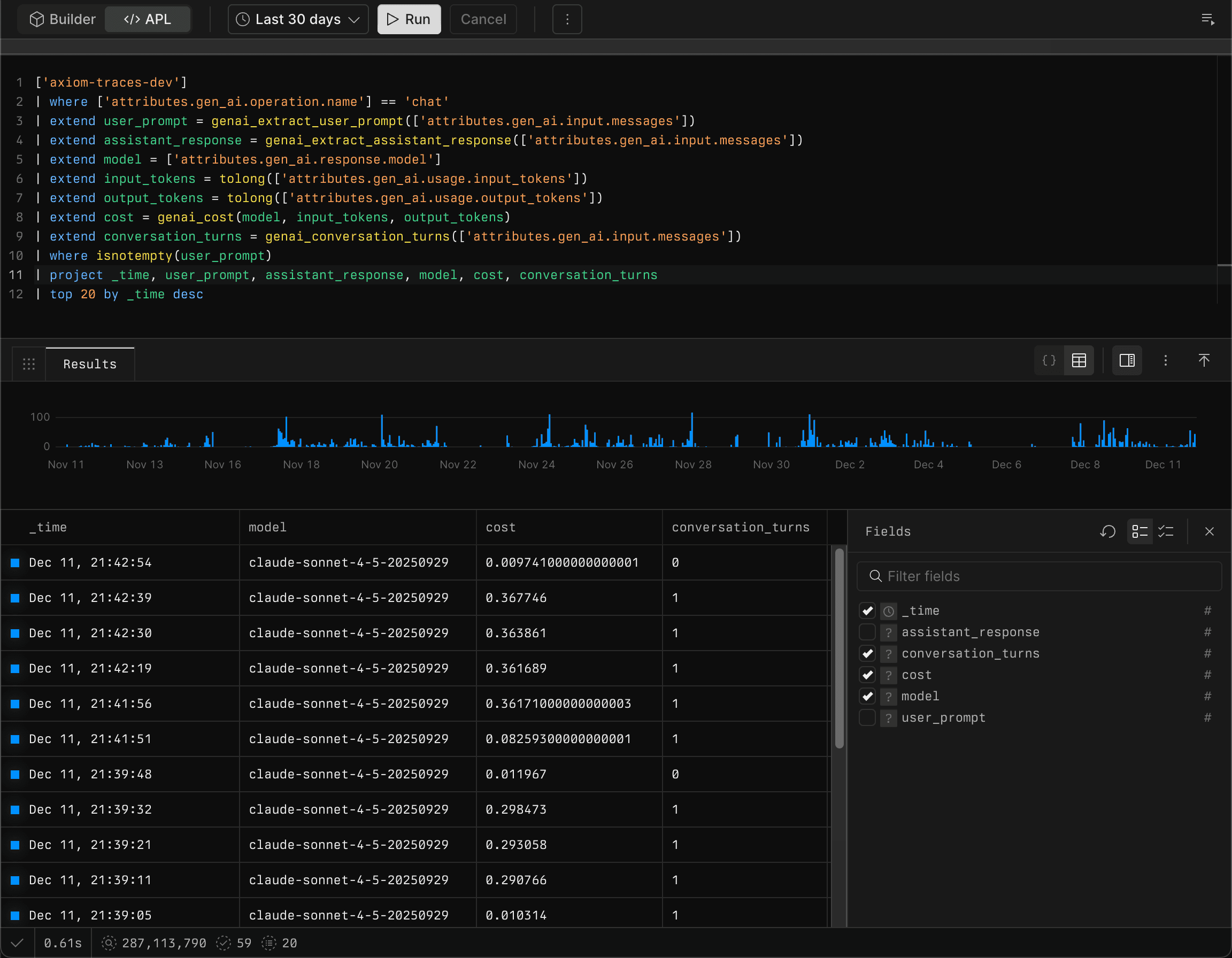
When support for OpenTelemetry GenAI spans was added, something different emerged. Unlike traditional observability data with simple scalar values, GenAI traces contain complex structures: arrays of messages, nested tool calls, conversation metadata. These aren’t just strings or integers. They’re JSON objects that require parsing, filtering, and extraction to unlock their value.
You could analyze this data with raw APL, but you’d be jumping through hoops. That’s why GenAI functions were built: a suite of purpose-built APL functions that understand the shape of GenAI conversation data and make it easy to extract insights.
Why GenAI functions exist
Traditional observability traces use scalar values: strings, integers, booleans. You query them with simple where clauses and basic aggregations. But GenAI traces are fundamentally different. They contain conversations: structured sequences of messages with roles, content, tool calls, and metadata.
Consider what teams need to understand about their AI applications:
Cost analysis: How much are enterprise customers spending? What’s the cost for customers using MCP-enabled features?
Conversation patterns: How many conversations stop after a tool result? How often do users abandon conversations after a system message?
Content analysis: What are users actually asking? Can you search user messages specifically, not just everything?
Debugging: Why did a conversation stop? Was the response truncated? What tool calls were made?
Without specialized functions, answering these questions means parsing JSON arrays, filtering by role, extracting nested fields, and calculating costs manually. It’s possible, but tedious. And when you’re analyzing thousands of conversations, tedious becomes impractical.
GenAI functions solve this by understanding the structure of GenAI data. They know what a conversation looks like, what roles messages have, how tool calls are structured, and how to calculate costs. You get the insights you need without the parsing overhead.
What makes GenAI functions different
Built for conversation analysis
GenAI functions understand conversations as structured data. Functions like genai_extract_user_prompt and genai_extract_assistant_response know how to find messages by role and extract their content. genai_conversation_turns counts the back-and-forth exchanges. genai_extract_tool_calls pulls out function invocations from messages.
This isn’t just convenience. It enables analysis that’s difficult or impossible with generic query functions. For example, you can extract all user messages and search for specific patterns, or analyze stop reasons to understand when users abandon conversations.
Cost analysis at any granularity
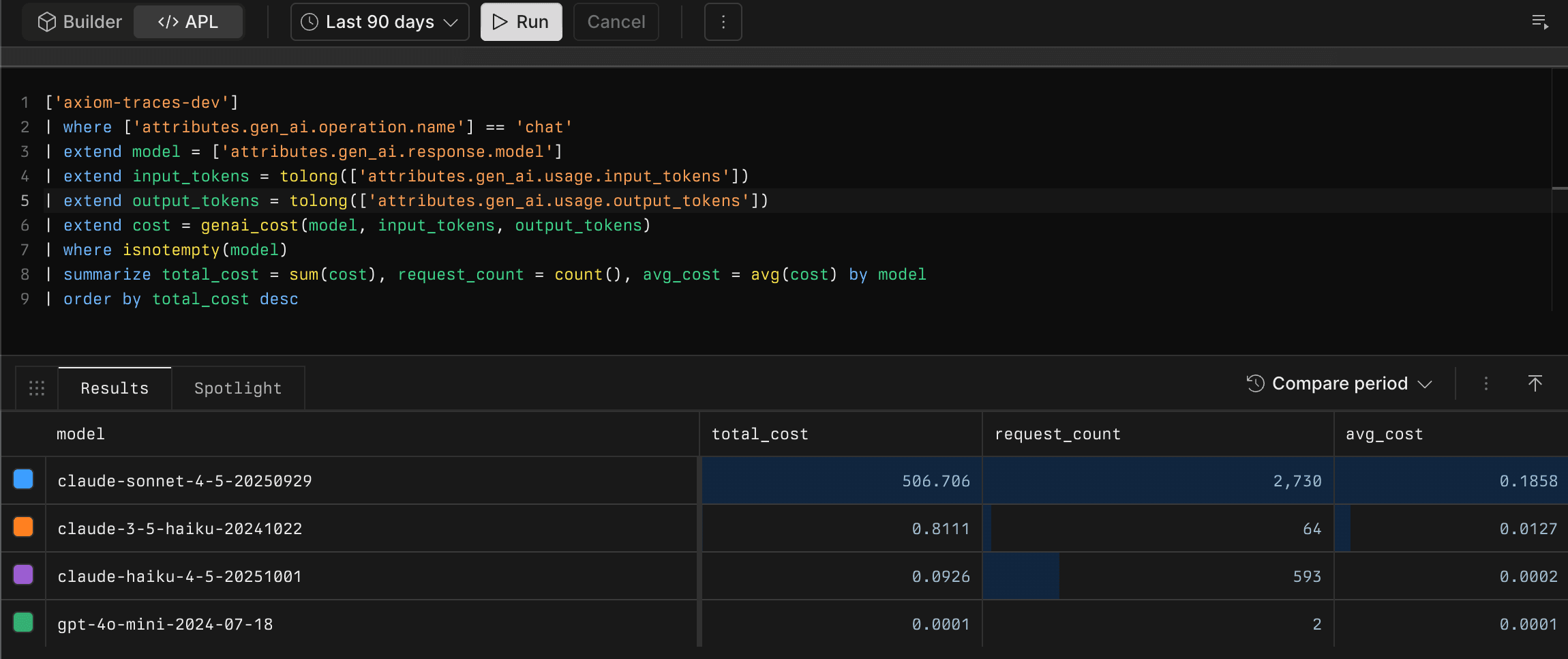
While many tools show you overall costs, GenAI functions let you slice and dice cost data however you need. Calculate costs for specific customer segments, features, or conversation types using genai_cost, genai_input_cost, and genai_output_cost.
Want to know the cost for enterprise customers using MCP? Filter by customer attributes, extract the conversation data, and calculate costs right in your query. The functions handle model pricing automatically, so you get accurate cost calculations without maintaining lookup tables.
Vertical stack advantage
GenAI functions demonstrate the power of owning the entire stack. Support for GenAI spans was built into the database, UI capabilities were added to view conversations, and now the query language is being extended with functions optimized for this data.
This vertical integration means the entire pipeline can be optimized for GenAI workloads. The database stores conversation data efficiently, the query engine understands conversation structures, and the functions leverage that understanding to make analysis straightforward.
Other platforms can’t easily do this. They’d need to coordinate changes across database, query engine, and UI layers, often across different teams and products. Axiom can move fast because it owns it all.
Available GenAI functions
GenAI functions provide a comprehensive suite of capabilities for analyzing AI conversations. Here’s a complete overview of all available functions:
Function | Description |
|---|---|
Concatenates message contents from a conversation array | |
Counts the number of conversation turns | |
Calculates the total cost for input and output tokens | |
Estimates the number of tokens in a text string | |
Extracts the assistant's response from a conversation | |
Extracts function call results from messages | |
Extracts the system prompt from a conversation | |
Extracts tool calls from messages | |
Extracts the user prompt from a conversation | |
Gets message content by index position | |
Gets message content by role | |
Gets pricing information for a specific model | |
Gets the role of a message at a specific index | |
Checks if messages contain tool calls | |
Calculates the cost for input tokens | |
Checks if a response was truncated | |
Extracts all message roles from a conversation | |
Calculates the cost for output tokens |
Real-world use cases
Cost analysis by customer segment
Calculate costs for specific customer groups or features:
Understanding conversation abandonment
Analyze stop reasons to understand when users abandon conversations:
Content analysis
Extract and analyze user prompts to understand what users are asking:
Observability for AI engineering
Traditional observability traces use scalar values that work fine with standard queries. But AI conversations require analysis: understanding flow, extracting meaning, calculating costs, and debugging interactions. These are new problems that need new solutions.
GenAI functions rise to the occasion by providing the specialized capabilities needed to understand and optimize AI applications at scale.
Learn more
Ready to start analyzing GenAI conversations? Check out the documentation:
GenAI functions overview: Learn about all available GenAI functions
Extract conversation data: Extract user prompts, assistant responses, and system prompts
Calculate costs: Analyze token usage and costs across models and segments
Analyze conversation flow: Understand conversation structure and turns
Start extracting insights from your AI conversations today.