Offline evaluations catch regressions before deployment. You run your capability against curated test cases, score the outputs, and ship with confidence that you haven’t broken what was working.
But offline evaluations only test what you thought to test. They can’t catch the edge cases you didn’t anticipate, the user inputs you didn't imagine, or the subtle quality degradations that accumulate over time. For those, you need signal from the people actually using your AI capability in production.
This is why every AI product with staying power has a feedback mechanism. Thumbs up, thumbs down, optional comments. It’s become ubiquitous because it works. Users tell you when something breaks. The challenge is connecting that signal to action.
Today we're releasing user feedback capture for AI capabilities in Axiom. Purpose-built tooling to collect feedback from end users, link it to the traces that show what your capability did, and surface patterns that guide improvement.
The gap between evaluation and production
Teams running continuous improvement cycles have a workflow that looks roughly like this: capture production traces, have domain experts review failures, turn those failures into test cases, build evaluations, and repeat.
But there’s a bootstrapping problem. How do you know which traces to review? Random sampling catches some issues, but it’s inefficient. You’re looking for needles in a haystack of successful interactions.
User feedback helps address this. When someone clicks thumbs down or writes “this answer was completely wrong,” you’ve found a needle. That trace goes to the top of the review queue. A domain expert examines what happened, documents the failure, and the trace becomes a test case that ensures the issue stays fixed.
Feedback is lightweight, high-volume, and direct user signal. It complements the deep qualitative insight you get from expert annotation with broad coverage you couldn’t achieve through sampling alone.
How it works
Axiom’s feedback system has two parts: a client SDK that captures feedback and links it to traces, and Console views that surface patterns and connect feedback to the AI behavior that produced it.
Capturing feedback
On the server, your AI capability runs inside withSpan, which creates a trace. You extract the trace and span IDs and return them to the client alongside your AI response.
On the client, you initialize a feedback client and send feedback events when users interact with your UI. The feedback is linked to the trace, so you can always see what the AI did when a user gave their rating.
The SDK supports multiple feedback types for different signals:
Type | Description | Example use |
|---|---|---|
| Thumbs up ( | Response quality rating |
| Numeric value | Star rating or relevance score |
| Boolean | “Was this helpful?” |
| Free-form string | User comments |
| Constrained string | Issue category selection |
| Event occurred, no value | User copied response or user regenerated |
Signals are particularly useful for implicit feedback. When a user copies your AI response, that’s a positive signal. When they regenerate, that’s often negative. These behavioral cues provide volume that explicit ratings can’t match.
Analyzing feedback in Console
Feedback events flow into a dedicated view in Axiom’s AI engineering tab. You see a table of feedback events with the feedback name, value, message, timestamp, and a link to the associated trace.
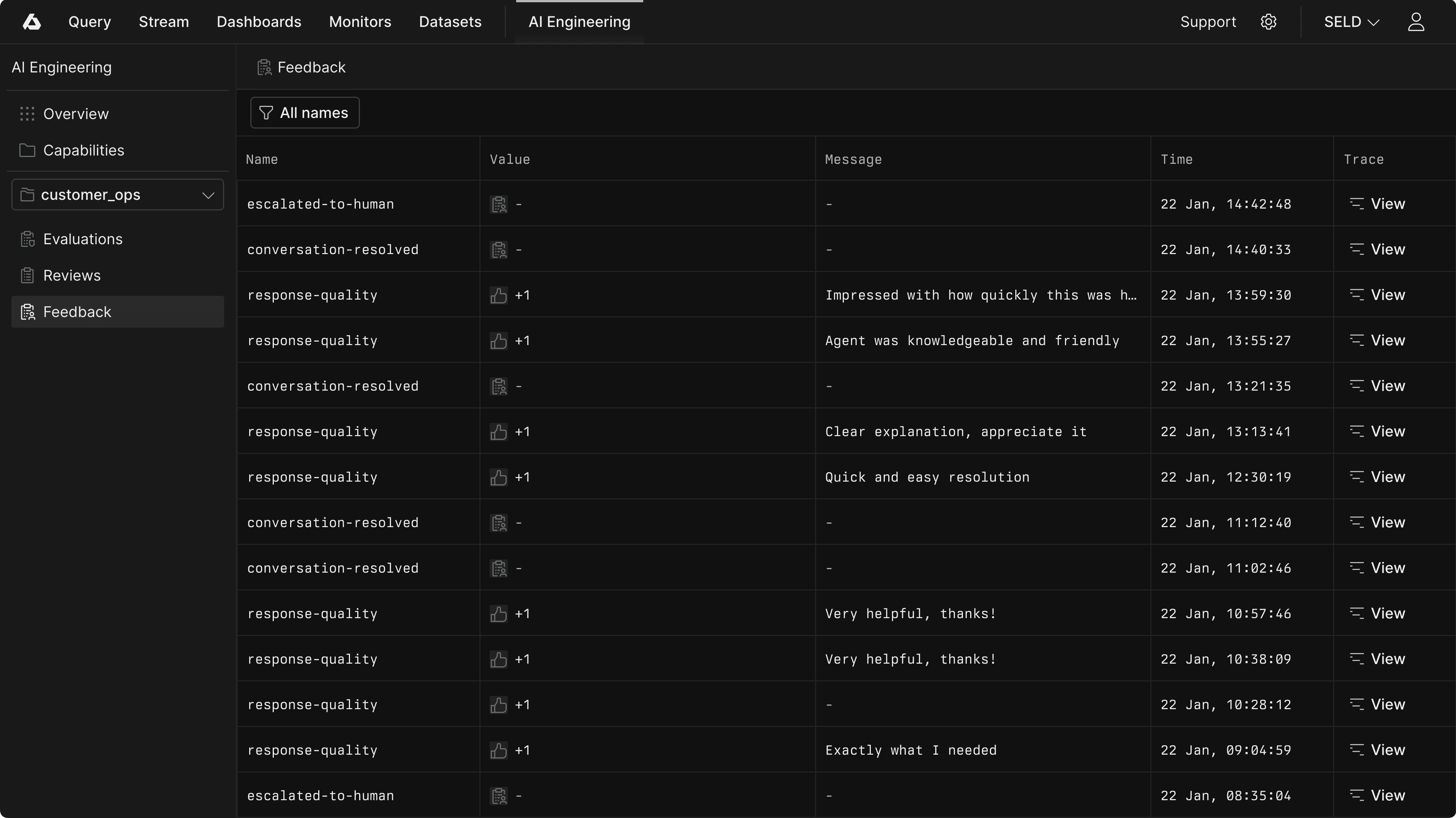
Filter by feedback name to focus on specific signals. When you select a name, a chart appears showing feedback trends over time. A spike in negative feedback after a deployment tells you something changed. A gradual improvement after a fix confirms it landed.
The key interaction is clicking through to the trace. When a user reports a problem, you want to see exactly what your capability did: the prompts, the completions, the tool calls, the retrieved context. One click from a feedback event takes you to the full AI trace in Axiom’s waterfall view and a handy conversation viewer. You’re not guessing what went wrong. You’re seeing it.
Click a feedback event to open the detail panel, which shows all fields including any metadata you attached. From there, “View trace” takes you to the associated AI trace where you can inspect every step of your capability’s execution.
From feedback to improvement
Collecting feedback is the starting point. The value comes from what you do with it.
The immediate use is triage. Negative feedback surfaces traces worth investigating. Your team reviews them, understands what went wrong, and fixes the issue. This is reactive, but it’s reactive to real user problems rather than hypothetical ones.
The deeper use is building your evaluation suite from production reality. When you find a trace where your capability failed, document what should have happened and add it to a collection. That failure becomes a test case. Your evaluation suite grows from real-world edge cases rather than examples you imagined during development.
Over time, patterns emerge. If you’re categorizing feedback (using enum types or text analysis), you can aggregate failures into themes. Maybe 30% of negative feedback mentions hallucinated features. Maybe a specific user cohort reports more issues than others. These patterns direct engineering effort to high-impact problems.
This is the continuous improvement loop that world-class AI engineering teams run. Production traces and user feedback reveal issues. Domain experts annotate what went wrong. Annotations become test cases. Evaluations verify fixes. The cycle continues. Feedback is the signal that makes the loop turn.
The bigger picture
User feedback is one piece of a larger system we’re building for AI engineering in Axiom.
We started with observability: rich telemetry capture for prompts, completions, tool calls, and costs. Then offline evaluations: systematic testing against curated collections before deployment. Now feedback capture: direct signal from production that surfaces issues evaluations miss.
What’s coming next:
Review workflows: Give domain experts a workspace to annotate flagged traces and document failures in structured ways
Online evaluations: Run scorers against live production traffic for real-time quality monitoring
The goal is a system where production insights directly strengthen your test coverage, and your evaluation results directly inform what to ship. Feedback is the bridge that connects what users experience to what you measure and improve.
Get started
User feedback is available now in Axiom’s AI SDK and Console.
Read the documentation for setup and integration patterns
Explore the SDK for the full feedback API
The teams shipping the most reliable AI capabilities aren’t just testing before deployment. They’re listening after it. That practice is now native to Axiom.