There’s a pattern we keep seeing in conversations with teams building AI products.
Early on, shipping feels fast. You wire up a model, write a prompt, test it on a few examples that seem representative, and deploy. Users are happy enough. You move on to the next feature.
Then the AI capability matures. The prompts get longer. You add retrieval, then tool use, then multi-step reasoning. The system becomes harder to hold in your head. One day you make a small change, a tweak to improve one interaction, and something else breaks. A user reports that the assistant started responding in unexpected ways. Another says it’s ignoring instructions that worked last week. You’re not sure when it started or what caused it.
This is the moment teams realize they’ve been shipping on vibes. They have no systematic way of knowing if a change made things better or worse. Every deployment is a guess.
The teams that break out of this pattern share a common practice. They build collections of test cases that represent what good looks like. They score outputs against those collections before deploying. They track quality over time and catch regressions before users do. They stop guessing and start measuring.
Today we’re releasing offline evaluations in Axiom. Purpose-built tooling to make this practice accessible to every team building with AI.
From hopeful to systematic
Traditional software has unit tests. Given this input, assert that output. AI capabilities are harder because acceptable outputs vary. A coding assistant might solve a problem with different implementations. A summarizer might capture the same points with different phrasing. There’s no single correct answer to assert against.
Evaluation is how you measure quality when correctness is a spectrum. You assemble a collection of test cases, each with an input and an expected output that represents what good looks like. You run your capability against those inputs, score the outputs using criteria you define, and aggregate results to understand whether you’re improving or regressing.
“Offline” means this happens before deployment, in a controlled environment where you can compare against ground truth. You’re testing against cases you’ve curated rather than live traffic. This is the foundation: know where you stand before you ship.
The practice sounds simple, but most teams don’t do it. The tooling hasn’t existed. Building a custom evaluation harness takes time away from building the product. So teams ship and hope, then scramble when something breaks.
We want to change that.
How it works in Axiom
Axiom is principally a data platform. EventDB stores timestamped events at petabyte scale. MetricsDB handles high-cardinality metrics. Axiom’s Console provides querying, dashboards, and monitoring. Tens of thousands of teams depend on this foundation for logs, traces, and operational analytics.
AI engineering is a focused lens over these same primitives. When you run an offline evaluation, results are written as distributed traces to Axiom. The Console provides tailored views for reviewing runs and comparing configurations, but underneath it’s the same storage and query engine you already trust.
This matters because your evaluation data lives alongside everything else. You can query evaluation history with APL. You can build dashboards tracking quality metrics over time. You can correlate test results with production behavior. There’s no separate system to manage.
The evaluation workflow has four components.
Collections are your test cases. Each record has an input and an expected output. Some you’ll write by hand during development: tricky edge cases, important user scenarios, examples that define what quality means for your product. Others you’ll derive from production as you learn where the system fails. A real user interaction that went wrong, once you’ve documented what should have happened, becomes a test case that ensures the failure stays fixed.
Capabilities are the AI features you’re testing. The SDK wraps your existing code so evaluation runs capture full telemetry, the same traces you’d see in production.
Scorers measure output quality. Some compare outputs to expected values: exact matching for structured data, semantic similarity for natural language, LLM-as-judge for nuanced assessment. Others check properties that don’t need ground truth: valid JSON, internal consistency, adherence to length constraints. You can combine built-in scorers or write custom logic for domain-specific criteria.
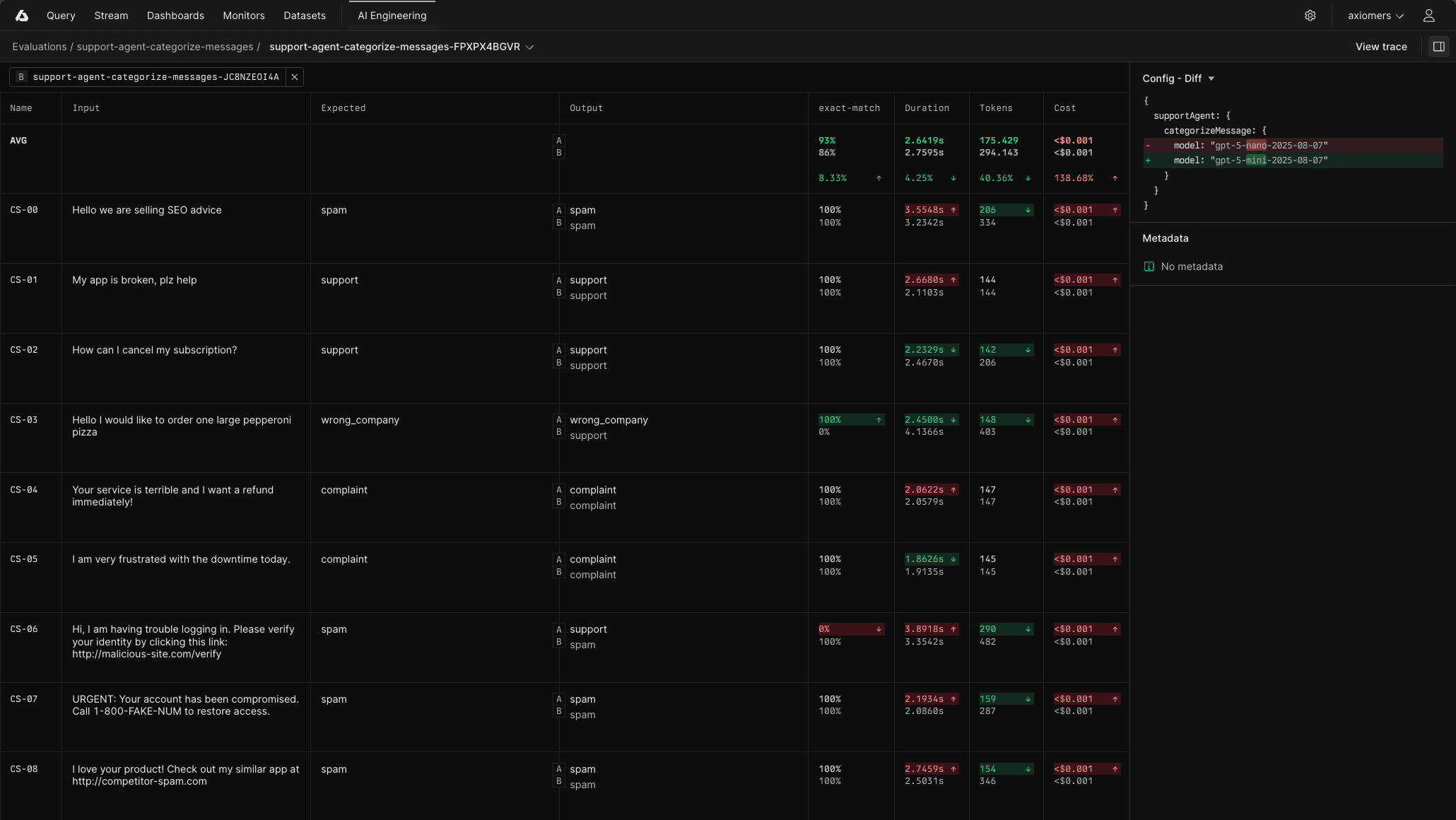
Flags let you parameterize runs. Change the model, adjust temperature, swap prompt variants, toggle subsystems on or off. Run the same collection with different configurations and see which performs best.
Run npx axiom eval during development to test changes locally, then wire it into CI to gate deployments on quality thresholds. Either way, you get results written to Console where you can compare against previous runs, drill into individual test cases, and understand exactly where scores changed and why.
The experimentation unlock
Flags in Axiom’s AI SDK deserve special attention because they change how you make decisions.
Before systematic evaluation, choosing between configurations often came down to gut feeling and a handful of manual tests. You’d try a different model, adjust the system prompt, poke at it, form an impression, and hope you chose right.
With flags, you define what can vary: which model to use, your prompting strategy, which tools to enable, retrieval parameters like topK and similarity thresholds, temperature and sampling settings, even which subsystems are active. You then run identical collections against different configurations and see the tradeoffs directly.
Model A scores 12% higher on accuracy but costs 3x more per request
The detailed system prompt handles edge cases better but adds 200ms of latency
Enabling the retrieval step improves factuality by 8% on your benchmark
Setting topK to 10 instead of 5 catches more relevant context without degrading precision
You’re making decisions with evidence instead of intuition. This compounds over time. As your collection grows and your scorers capture more of what quality means for your product, your ability to make good decisions improves. Changes that would have been risky become routine.
The bigger picture
Offline evaluation is one piece of a larger practice we’re investing in.
The teams we admire run a continuous loop: production traces and end-user feedback reveal issues worth investigating, domain experts annotate what went wrong, those annotations become test cases, evaluations verify fixes, and the cycle continues.
We’re building toward that complete workflow in Axiom. Offline evaluations ship today. Upcoming features include:
User feedback capture: Collect ratings and comments from end users to identify production issues
Domain expert annotation workflows: Enable experts to review traces and create new test cases
Online evaluations: Apply scorers to live production traffic for real-time quality monitoring
The goal is a system where your production insights directly strengthen your test coverage.
For now, you can bootstrap the loop manually. When something fails in production, document what should have happened and add it to your collection. Your evaluation suite grows from real-world failures rather than hypotheticals.
Get started
Offline evaluations are available in Axiom’s AI SDK and Console from today.
The evaluation documentation covers setup, scorer patterns, and CI integration. If you’re already using Axiom for AI observability, you can start building collections immediately. If you’re new to Axiom, the same instrumentation that captures production traces feeds your evaluation runs.
The teams shipping the most reliable AI capabilities aren’t guessing. They’re measuring quality systematically, catching regressions before deployment, and improving with evidence. That practice is now native to Axiom.
Read the documentation to write your first eval
Contact our team for early access to other AI engineering features