Send Claude Platform traces to Axiom
Add Axiom as an OpenTelemetry destination in the Claude Console to send traces of your Claude API requests and Managed Agents sessions to Axiom.
The Claude API can export OpenTelemetry traces of your Messages API requests, server tool uses, and Claude Managed Agents sessions. You configure the export once for your organization in the Claude Console by adding a telemetry destination. No code changes or OpenTelemetry Collector are needed. Axiom natively ingests OTLP/HTTP, so you can add Axiom as a destination with the Custom provider.
The spans use the OpenTelemetry semantic conventions for generative AI (gen_ai.* attributes), so they work with Axiom’s LLM observability features, such as the AI traces waterfall view and the GenAI dashboard.
Prerequisites
- Create an Axiom account.
- Create a dataset in Axiom for the traces, for example
claude-platform-traces. - Create an API token in Axiom with permissions to ingest data to the dataset you have created.
- Have the admin role in your Claude Console organization. The developer role can only view destinations. For more information, see the Claude documentation.
Claude Platform exports traces only. It doesn’t export logs or metrics, so you don’t need a metrics dataset or the x-axiom-metrics-dataset header for this integration.
Add Axiom as a destination
-
In the Claude Console, go to your organization’s OpenTelemetry settings page, and then click Add destination.
-
Configure the destination with the following values:
Field Value Provider Custom Name Optional. For example, Axiom.OTLP endpoint URL https://AXIOM_DOMAINRequest headers Authorization:Bearer API_TOKENX-Axiom-Dataset:DATASET_NAMEContent mode Metadata only or Full content. For more information, see Choose a content mode. Workspaces The Claude workspaces whose traces you want to send to Axiom. Enter the OTLP endpoint URL without a path. Claude appends
/v1/traces, so it sends the traces tohttps://AXIOM_DOMAIN/v1/traces. Leave OTLP traces endpoint URL under Advanced settings empty. -
Click Add destination.
-
In the destination’s More actions menu, click Test. Claude sends a test span named
anthropic.testto Axiom and reports whether the delivery succeeded.
For more information about each field, see the Claude documentation. To add the destination with the Claude Admin API instead of the Console, pass the same endpoint URL and headers. For more information, see the telemetry destinations API.
Choose a content mode
The content mode determines whether spans include prompts and responses:
- Metadata only is the default. Spans include identifiers, timing, status, and token counts, but no prompts or responses.
- Full content adds the system prompt, the input and output messages, and tool arguments and results. Use it to read full conversations in Axiom’s Conversation view. Axiom stores this content under the retention and access settings of your dataset.
If you select Full content, keep Maximum content size in MB under Advanced settings at 0.75 MB or lower. This keeps the content of each span below the maximum field size of 1 MB in Axiom. If a message is larger, Axiom keeps the span but replaces the oversized text with <invalid string: too long>. Don’t leave the field empty because Claude then sends as much content as the API allows. For more information, see Content limits.
Verify the integration
-
In the Claude Console, select a workspace that the destination covers, and then send a Messages API request in the playground. You can also send a request from your app or start a Managed Agents session in that workspace.
-
On the OpenTelemetry settings page, check that the Delivery column shows Healthy for the destination. This can take about a minute.
-
In Axiom, click the Query tab, and then run the following query:
APLThe results show spans such as
anthropic.messages.createfor Messages API requests,anthropic.model_requestfor each model run,anthropic.tool_usefor server tool uses, andanthropic.session.turnfor Managed Agents turns. For the full list of spans and attributes, see the Claude span reference. -
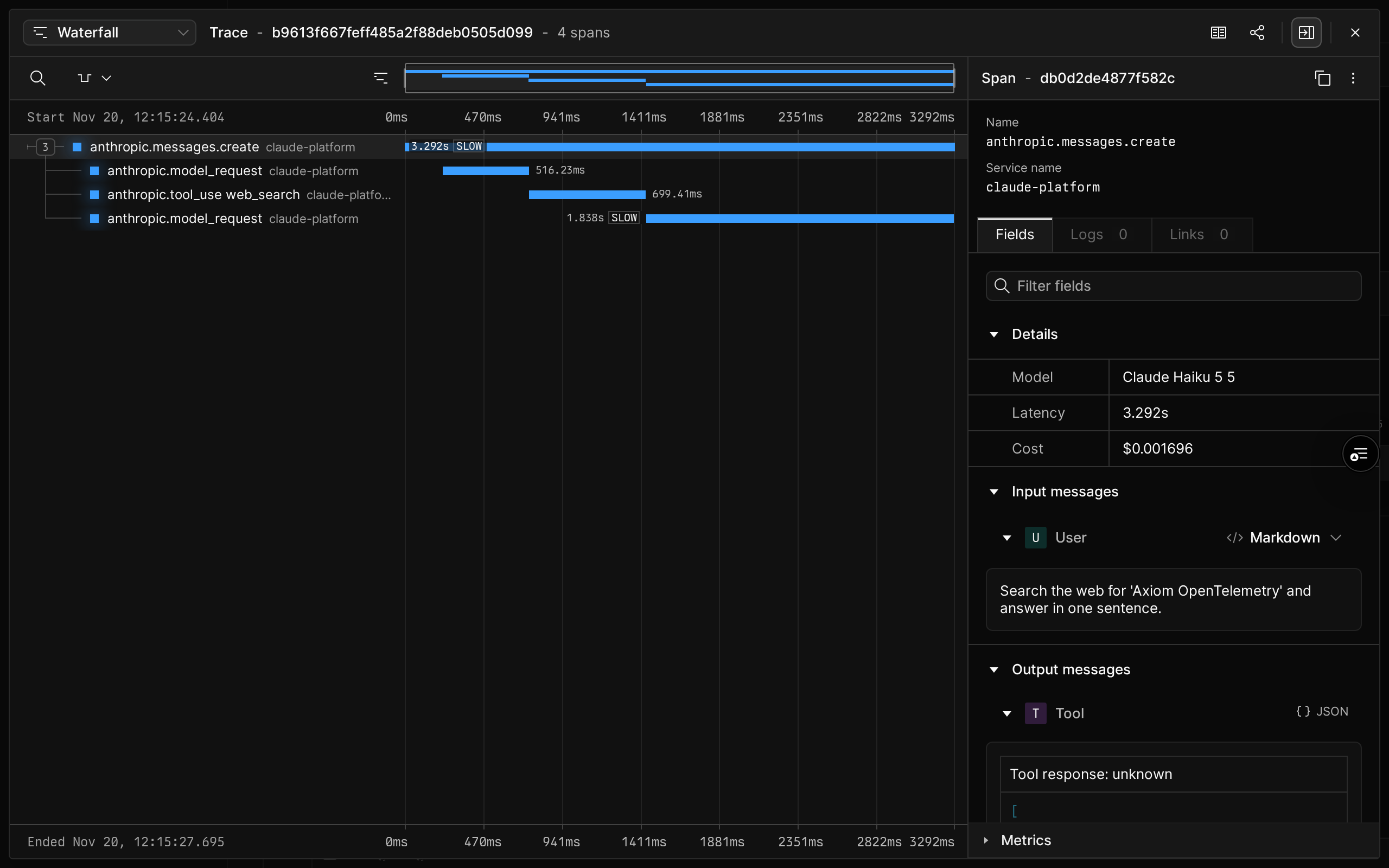
Click a trace ID to open the trace in the waterfall view. For example, a Messages API request that uses the web search tool contains a span for each model request and a span for the tool use:
-
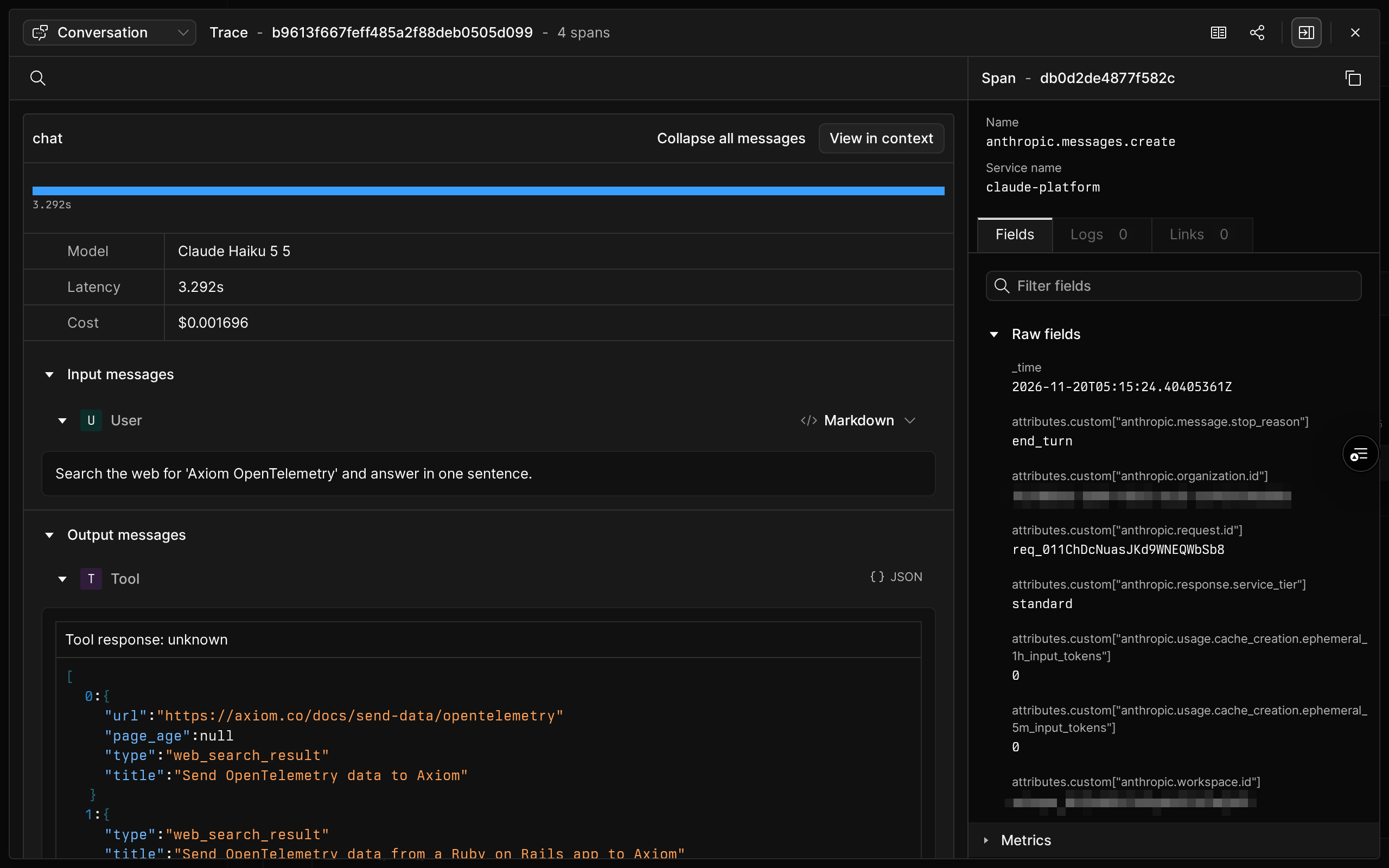
If you selected Full content, select Conversation in the view menu of the trace to read the prompt and the response:
Analyze Claude Platform traces
Claude Platform spans set the gen_ai.operation.name attribute. When the field attributes.gen_ai.operation.name is present in a dataset, Axiom creates the Generative AI Overview (DATASET_NAME) dashboard with token usage, cost, latency, and error rates. For more information, see LLM observability.
To build your own token usage queries, count each token once. Claude adds token usage attributes to several levels of spans, so summing every span counts the same tokens more than once. For Messages API requests, sum the anthropic.messages.create spans of kind server:
Attributes that aren’t part of the OpenTelemetry semantic conventions are in the attributes.custom map field. These include the Claude attributes that start with anthropic., such as the workspace ID and the Managed Agents session ID, and the prompt cache token counts. For example, to filter by Claude workspace, use ['attributes.custom']['anthropic.workspace.id']. For more information, see Map fields.
For Managed Agents sessions and compactions, different spans hold the token usage. For more information, see Counting tokens.
Claude delivers spans at least once, so a span can arrive more than once. To remove duplicates, use the trace ID and the span ID.
Connect Claude spans to your own traces
By default, the spans of each Claude API request are in their own trace. To nest them under the spans of your app, send the W3C traceparent header with your Claude API requests. The Anthropic SDK does this automatically when you set up SDK tracing. Send the traces of your app to the same Axiom dataset so that Axiom shows your spans and the Claude spans in one trace.
To send the traces of your app to Axiom, configure its OTLP exporter with the endpoint https://AXIOM_DOMAIN/v1/traces and the same Authorization and X-Axiom-Dataset headers. For more information, see Send OpenTelemetry data to Axiom, Set up SDK tracing, and Connect API spans to your own traces.
Troubleshooting
If the Delivery column shows Failing, hover over it to see the last error.
| Error | Likely cause in Axiom |
|---|---|
| HTTP error (status 401) or HTTP error (status 403) | The API token is wrong, or it doesn’t have permission to ingest data to the dataset. Check that the Authorization header value starts with Bearer . |
| HTTP error (status 404) | The OTLP endpoint URL has a path, or the X-Axiom-Dataset header names a dataset that doesn’t exist. Enter https://AXIOM_DOMAIN without /v1/traces, and check the dataset name. |
| Invalid address | The edge deployment domain is wrong. For the list of domains, see Edge deployments. |
If the Delivery column shows Healthy but you can’t find spans of your requests in Axiom, check that the destination covers the workspace where you send requests.
If all deliveries fail for 24 hours, Claude turns off the destination and the Delivery column shows Disabled. Claude doesn’t send the spans it drops while the destination is off. After you fix the cause, test the destination, and then enable it again. For the full list of errors and delivery rules, see Troubleshooting and Delivery and health in the Claude documentation.