Export traces from the OpenAI Agents SDK for Python and TypeScript to Axiom over OpenTelemetry, and analyze agent runs in the GenAI dashboard and AI trace view.
The OpenAI Agents SDK records a trace for every agent run, with spans for agents, model calls, and tool calls. By default, the SDK sends these traces to the OpenAI Traces dashboard. This page explains how to send them to Axiom over OpenTelemetry instead, so that each run appears in Axiom’s AI trace waterfall view and GenAI dashboard.
The Agents SDK lets you register custom tracing processors that receive every trace and span. The setups on this page use that interface to turn Agents SDK spans into OpenTelemetry spans that follow the GenAI semantic conventions, and export them to Axiom over OTLP/HTTP:
TypeScript: A short tracing processor that you add to your project. It uses the Agents SDK’s public TracingProcessor interface and the OpenTelemetry JavaScript SDK.
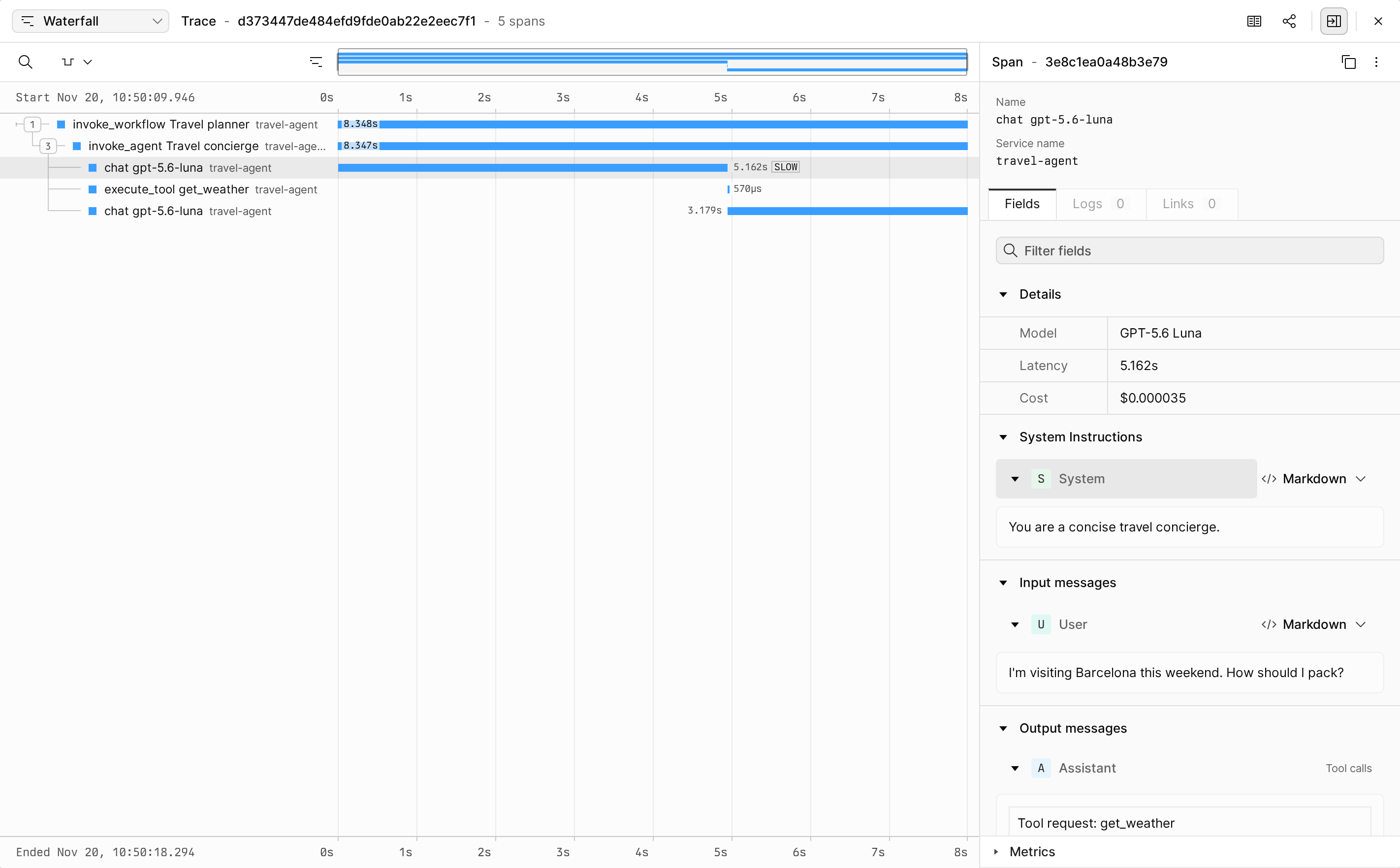
Both setups produce the same span structure. Each agent run becomes one trace:
Agents SDK span
OpenTelemetry span name
gen_ai.operation.name
Trace of the run
invoke_workflow WORKFLOW_NAME
invoke_workflow
Agent span
invoke_agent AGENT_NAME
invoke_agent
Model call (response or generation span)
chat MODEL_NAME
chat
Function tool span
execute_tool TOOL_NAME
execute_tool
Model call spans include the model name, the response ID, and the input and output token counts in gen_ai.request.model, gen_ai.response.model, gen_ai.response.id, gen_ai.usage.input_tokens, and gen_ai.usage.output_tokens. When you capture content, model call spans also include the conversation in gen_ai.input.messages and gen_ai.output.messages, and tool spans include the tool arguments and result in gen_ai.tool.call.arguments and gen_ai.tool.call.result.
Neither setup exports task, turn, guardrail, handoff, or custom spans as separate spans. Spans nested inside them appear under the closest exported parent.
Configure OpenTelemetry once when your app starts, before you run an agent. The following example is a complete script:
python
from agents import Agent, RunConfig, Runner, function_toolfrom opentelemetry import tracefrom opentelemetry.exporter.otlp.proto.http.trace_exporter import OTLPSpanExporterfrom opentelemetry.instrumentation.genai.openai import OpenAIInstrumentorfrom opentelemetry.instrumentation.genai.openai_agents import OpenAIAgentsInstrumentorfrom opentelemetry.sdk.resources import Resourcefrom opentelemetry.sdk.trace import TracerProviderfrom opentelemetry.sdk.trace.export import BatchSpanProcessor# Send spans to Axiom over OTLP/HTTPprovider = TracerProvider(resource=Resource.create({"service.name": "travel-agent"}))provider.add_span_processor( BatchSpanProcessor( OTLPSpanExporter( endpoint="https://AXIOM_DOMAIN/v1/traces", headers={ "Authorization": "Bearer API_TOKEN", "X-Axiom-Dataset": "DATASET_NAME", }, ) ))trace.set_tracer_provider(provider)# Create chat spans for model callsOpenAIInstrumentor().instrument()# Create agent and tool spans, and stop sending traces to OpenAIOpenAIAgentsInstrumentor().instrument(disable_openai_trace_export=True)@function_tooldef get_weather(city: str) -> str: return f"The forecast for {city} is sunny."agent = Agent( name="Travel concierge", instructions="You are a concise travel concierge.", tools=[get_weather],)result = Runner.run_sync( agent, "I'm visiting Barcelona this weekend. How should I pack?", run_config=RunConfig(workflow_name="Travel planner"),)print(result.final_output)# Export buffered spans before the process exitsprovider.shutdown()
The example does the following:
OTLPSpanExporter sends spans to the /v1/traces endpoint of your edge deployment using HTTP with Protobuf encoding.
OpenAIInstrumentor creates a chat span for each call the OpenAI Python client makes, including calls to the Responses API that the Agents SDK uses by default.
OpenAIAgentsInstrumentor registers a tracing processor with the Agents SDK and creates the workflow, agent, and tool spans. Model call spans nest under the agent span that made the call.
RunConfig(workflow_name=...) sets the name of the workflow span. Without it, the Agents SDK names traces Agent workflow.
provider.shutdown() exports the remaining spans before the script exits. In a long-running service, call it when the service shuts down. BatchSpanProcessor exports spans in the background while the service runs.
By default, OpenAIAgentsInstrumentor().instrument() adds its processor next to the Agents SDK’s default exporter, so traces go to both Axiom and the OpenAI Traces dashboard. The example passes disable_openai_trace_export=True to replace the default exporter and send traces only to Axiom. Remove that argument to keep both destinations.
By default, the OpenTelemetry instrumentation doesn’t capture message content. Spans include models, token counts, and tool names, but no prompts, responses, tool arguments, or tool results.
To view conversations in Axiom, set the following environment variable before you start your app:
Possible values are span_only, event_only, span_and_event, and no_content. Axiom’s conversation view reads content from span attributes, so use span_only or span_and_event.
OpenAIInstrumentor only creates spans for calls made with the OpenAI Python client. This includes OpenAI-compatible endpoints that you call through that client. If an agent uses a model through another client, for example with the LiteLLM extension, the trace contains workflow, agent, and tool spans but no chat spans for that model.
The TypeScript setup uses the @openai/agents package and requires a Node.js version that runs TypeScript files natively, such as Node.js 24. If you compile TypeScript first, remove the .ts extension from local imports.
Create a file named axiom-tracing.ts with the following content. The processor creates an OpenTelemetry span for each Agents SDK span listed in What Axiom receives and nests it under the matching parent.
typescript
import type { Span as AgentsSpan, Trace, TracingProcessor } from '@openai/agents';import { context, SpanKind, SpanStatusCode, trace, type Span, type Tracer } from '@opentelemetry/api';type Message = { role: string; parts: Record<string, unknown>[]; finish_reason?: string };// Convert Agents SDK items, Responses API items, and Chat Completions messages to OpenTelemetry GenAI messagesfunction toMessages(items: unknown): Message[] { if (typeof items === 'string') return [{ role: 'user', parts: [{ type: 'text', content: items }] }]; if (!Array.isArray(items)) return []; const messages: Message[] = []; for (const item of items) { // The Agents SDK uses `callId` and `function_call_result`, the Responses API uses `call_id` and `function_call_output` const id = item.call_id ?? item.callId; if (item.type === 'function_call') { messages.push({ role: 'assistant', parts: [{ type: 'tool_call', id, name: item.name, arguments: item.arguments }] }); } else if (item.type === 'function_call_output' || item.type === 'function_call_result') { const output = item.output; const response = typeof output === 'string' ? output : typeof output?.text === 'string' ? output.text : JSON.stringify(output); messages.push({ role: 'tool', parts: [{ type: 'tool_call_response', id, response }] }); } else if (item.role) { const content = typeof item.content === 'string' ? [{ text: item.content }] : (item.content ?? []); const parts: Record<string, unknown>[] = content .filter((c: any) => typeof c.text === 'string') .map((c: any) => ({ type: 'text', content: c.text })); for (const call of item.tool_calls ?? []) { parts.push({ type: 'tool_call', id: call.id, name: call.function?.name, arguments: call.function?.arguments }); } messages.push({ role: item.role, parts }); } } return messages;}function attributesFor(span: AgentsSpan<any>): [string, Record<string, any>, SpanKind] | undefined { const data = span.spanData; switch (data.type) { case 'agent': return [`invoke_agent ${data.name}`, { 'gen_ai.operation.name': 'invoke_agent', 'gen_ai.agent.name': data.name }, SpanKind.INTERNAL]; case 'function': return [`execute_tool ${data.name}`, { 'gen_ai.operation.name': 'execute_tool', 'gen_ai.tool.name': data.name, 'gen_ai.tool.type': 'function', 'gen_ai.tool.call.arguments': data.input, 'gen_ai.tool.call.result': data.output, }, SpanKind.INTERNAL]; case 'response': { // Model calls through the Responses API, the SDK default const response = data._response; const output = toMessages(response?.output); if (output.length) output[output.length - 1].finish_reason = output.some((m) => m.parts.some((p) => p.type === 'tool_call')) ? 'tool_call' : 'stop'; return [`chat ${response?.model ?? ''}`.trim(), { 'gen_ai.operation.name': 'chat', 'gen_ai.provider.name': 'openai', 'gen_ai.request.model': response?.model, 'gen_ai.response.model': response?.model, 'gen_ai.response.id': data.response_id ?? response?.id, 'gen_ai.usage.input_tokens': response?.usage?.input_tokens, 'gen_ai.usage.output_tokens': response?.usage?.output_tokens, 'gen_ai.input.messages': data._input ? JSON.stringify(toMessages(data._input)) : undefined, 'gen_ai.output.messages': output.length ? JSON.stringify(output) : undefined, }, SpanKind.CLIENT]; } case 'generation': // Model calls through Chat Completions and other model providers return [`chat ${data.model ?? ''}`.trim(), { 'gen_ai.operation.name': 'chat', 'gen_ai.request.model': data.model, 'gen_ai.response.model': data.model, 'gen_ai.usage.input_tokens': data.usage?.input_tokens, 'gen_ai.usage.output_tokens': data.usage?.output_tokens, 'gen_ai.input.messages': data.input ? JSON.stringify(toMessages(data.input)) : undefined, 'gen_ai.output.messages': data.output ? JSON.stringify(toMessages(data.output)) : undefined, }, SpanKind.CLIENT]; default: return undefined; }}// Turns Agents SDK traces and spans into OpenTelemetry spansexport class AxiomTracingProcessor implements TracingProcessor { #spans = new Map<string, Span>(); #tracer: Tracer; constructor(tracer: Tracer) { this.#tracer = tracer; } async onTraceStart(t: Trace) { this.#spans.set(t.traceId, this.#tracer.startSpan(`invoke_workflow ${t.name}`, { attributes: { 'gen_ai.operation.name': 'invoke_workflow', 'gen_ai.workflow.name': t.name, 'gen_ai.conversation.id': t.groupId ?? undefined }, })); } async onTraceEnd(t: Trace) { this.#spans.get(t.traceId)?.end(); this.#spans.delete(t.traceId); } async onSpanStart(span: AgentsSpan<any>) { const parent = this.#spans.get(span.parentId ?? span.traceId) ?? this.#spans.get(span.traceId); if (!parent) return; const known = attributesFor(span); // Keep spans this processor doesn't map, such as turns and guardrails, as parents without exporting them if (!known) { this.#spans.set(span.spanId, parent); return; } const ctx = trace.setSpan(context.active(), parent); const startTime = span.startedAt ? new Date(span.startedAt) : undefined; this.#spans.set(span.spanId, this.#tracer.startSpan(known[0], { kind: known[2], startTime }, ctx)); } async onSpanEnd(span: AgentsSpan<any>) { const otelSpan = this.#spans.get(span.spanId); this.#spans.delete(span.spanId); const known = attributesFor(span); if (!otelSpan || !known) return; // Model and tool data is available when the span ends otelSpan.updateName(known[0]); for (const [key, value] of Object.entries(known[1])) { if (value !== undefined && value !== null && value !== '') otelSpan.setAttribute(key, value); } if (span.error) { otelSpan.setStatus({ code: SpanStatusCode.ERROR, message: span.error.message }); } otelSpan.end(span.endedAt ? new Date(span.endedAt) : undefined); } async shutdown() {} async forceFlush() {}}
Create a file named instrumentation.ts with the following content:
typescript
import { setTraceProcessors } from '@openai/agents';import { OTLPTraceExporter } from '@opentelemetry/exporter-trace-otlp-proto';import { resourceFromAttributes } from '@opentelemetry/resources';import { BatchSpanProcessor, TracerProvider } from '@opentelemetry/sdk-trace';import { AxiomTracingProcessor } from './axiom-tracing.ts';// Send spans to Axiom over OTLP/HTTPexport const tracerProvider = new TracerProvider({ resource: resourceFromAttributes({ 'service.name': 'travel-agent' }), spanProcessors: [ new BatchSpanProcessor({ exporter: new OTLPTraceExporter({ url: 'https://AXIOM_DOMAIN/v1/traces', headers: { Authorization: 'Bearer API_TOKEN', 'X-Axiom-Dataset': 'DATASET_NAME', }, }), }), ],});// Replace the default OpenAI exporter with the Axiom processorsetTraceProcessors([new AxiomTracingProcessor(tracerProvider.getTracer('openai-agents'))]);
setTraceProcessors replaces the Agents SDK’s default exporter, so traces go only to Axiom. To send traces to both Axiom and the OpenAI Traces dashboard, call addTraceProcessor with the same argument instead.
Import instrumentation.ts before you run an agent. The following example is a complete script:
typescript
import { tracerProvider } from './instrumentation.ts';import { Agent, getGlobalTraceProvider, Runner, tool } from '@openai/agents';import { z } from 'zod';const getWeather = tool({ name: 'get_weather', description: 'Get the weather for a city', parameters: z.object({ city: z.string() }), execute: async ({ city }) => `The forecast for ${city} is sunny.`,});const agent = new Agent({ name: 'Travel concierge', instructions: 'You are a concise travel concierge.', tools: [getWeather],});const runner = new Runner({ workflowName: 'Travel planner' });const result = await runner.run(agent, "I'm visiting Barcelona this weekend. How should I pack?");console.log(result.finalOutput);// Export buffered spans before the process exitsawait getGlobalTraceProvider().forceFlush();await tracerProvider.shutdown();
Run the script with node agent.ts.
The example does the following:
new Runner({ workflowName }) sets the name of the workflow span. Without it, the Agents SDK names traces Agent workflow.
getGlobalTraceProvider().forceFlush() and tracerProvider.shutdown() export the remaining spans before the script exits. In a long-running service, call them when the service shuts down. In runtimes without a background export loop, such as Cloudflare Workers, call them at the end of each request. For more information, see Export loop lifecycle in the Agents SDK documentation.
The processor exports the data that the Agents SDK records. By default, the Agents SDK includes prompts, responses, tool arguments, and tool results in its spans.
To stop capturing this content, set traceIncludeSensitiveData: false in the run configuration:
With this setting, the Agents SDK also leaves the model name and token counts out of its spans for Responses API calls. Model call spans in Axiom then contain only gen_ai.operation.name and gen_ai.provider.name, and the GenAI dashboard shows no model or token usage data for them.
After your app runs an agent, Axiom shows the traces in the following places:
GenAI dashboard: Axiom creates the dashboard automatically when attributes.gen_ai.operation.name is present in your dataset. Click the Dashboards tab, and then click Generative AI Overview (DATASET_NAME). The dashboard shows requests by operation and agent, token usage and cost, errors, and a comparison of models.
AI trace waterfall view: Click the Query tab, run a query on your dataset, and then click a trace ID. The waterfall shows the workflow, agent, model call, and tool spans of the run. Click a model call span to see its model, latency, cost, and messages.
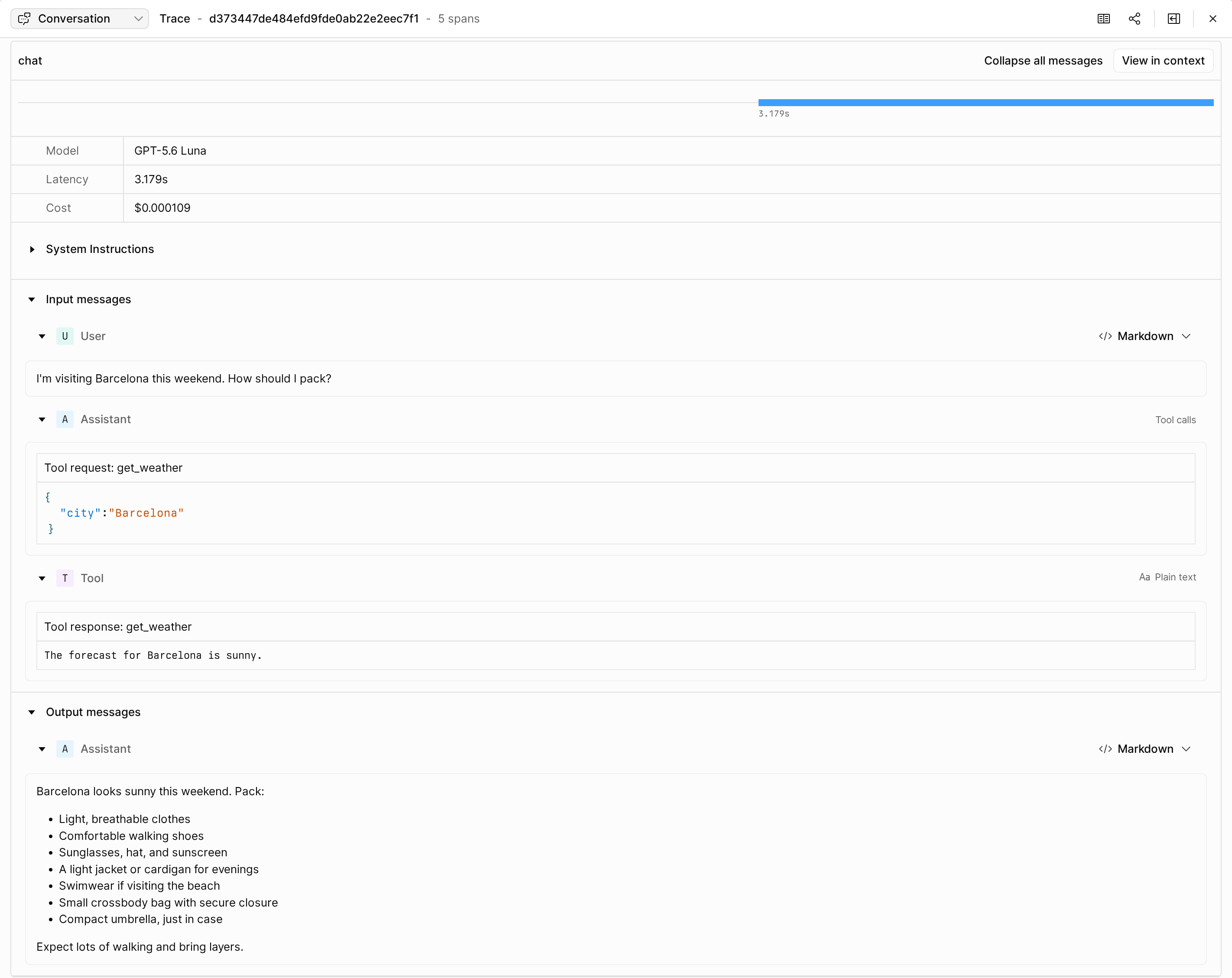
If you capture content, select the Conversation view from the menu at the top left to read the prompts, tool calls, tool results, and responses of each model call.